
Connecting an installation to a beam host
A beam host is a small public service you run yourself. Every installation dials out to it over WSS and claims a named slot, so a browser anywhere reaches that installation at https://<host>/__beam/go/<slot> without the installation having an inbound port, a hostname or a certificate of its own.
Drawing the diagram…
This page assumes the host is already running and you have two things from whoever operates it:
- the host address,
https://beam.example.com - a slot token: the host's
BEAM_SLOTSis aname=tokenlist, and each of those tokens opens the one slot it names. Every installation should hold one of those, a desktop as much as a server, never the operator's masterBEAM_TOKEN.
A slot name is lowercase letters, digits and hyphens, at most 31 characters. A slot token is also a sync tenant (slot:<name>), so the same credential covers the tunnel and that installation's logbook sync. That also means each machine syncs a logbook of its own; to give several machines one archive, join them to a shared logbook.
Desktop setup
Same in every build: Settings > Beam. Enter the host URL, the slot token and the slot name, then press Check the host before you save: it says whether the host answered, whether that token is a tunnel credential there, which slot it actually opens, and whether anything is on that slot already. Switch Beam on and save.
The status bar's beam item then lists the instances the host carries, what each one is running - version, platform, uptime and how many sessions are alive - shows a pairing code for a phone or another browser, and opens an instance in a window of its own.
The rest of the page is named for who reaches this installation and how: Logbook sync is the archive's timer, Machine setup hands keys and loadouts to another of your machines, Phones pairs the mobile app, Remote browser signs a browser on another machine in to the full interface with a one-time link, At the controls says who is driving, Instances on this host lists the other installations on the same host, Inbound from other machines says what each of those installations may do here, and Browsers on this machine pairs a second local browser such as the dev mirror.
Check the host warns when the token is the host's operator token, which opens every slot and the dataset. Give each machine a slot token of its own, and keep the operator token off machines that run agents.
To sign in to this machine with a password from elsewhere, set one first under Settings > Access. A desktop starts with a password nobody knows, and a password sign-in through the beam is refused while the password is admin (Access).
Changing the host URL clears the saved token, and the saved logins of instances on the old host, unless you enter a token for the new one; the page says what was cleared. On macOS and Linux the settings file that holds them is readable by your account only.
Changing the link through the beam itself - from a page on another machine - is a trial: if the tunnel is not back within a minute, the installation puts the old host, token and slot back on its own, and the page says it did. Switching Beam off from the far side asks for a second click first, because only someone at that machine can switch it back on.
What the tunnel is actually carrying is on the item beside it: hover Desktop or Hosted for both directions as a rate and a total, the round trip to the host, and how much the tunnel is holding. On a window reached through a beam it also times its own round trip, which is the whole path there and back.
With a slot token, type its slot into the form too: a typed slot is pinned, and the installation dials it and nothing else.
Machines that share the host's operator token can leave the slot empty, and each one finds its own: the first takes default, and the next lands on a slot named after itself, such as airkdl, and keeps it from then on. Reach that one at <host>/__beam/go/airkdl, or open it from the beam item. A dev task on a profile of its own takes <machine>-<profile> and leaves default to the app. That is a shortcut for one person's own machines, not a fleet: each of them can open any slot and they all sync into one archive. Moving a machine to a slot token of its own gives it an archive of its own, and its next sync uploads its sessions again (Administering several beam hosts).
If another machine is already on a slot you named, the page says which one, and this installation waits for it rather than pushing it off. The status strip then reads Beam · on followed by that machine's name. This installation connects by itself the moment that machine disconnects. Take the slot takes it now, and Use slot moves this machine to a slot of its own instead.
| Platform | Note |
|---|---|
| macOS | Nothing else. The app dials out; no firewall prompt, since nothing listens off loopback |
| Windows | Same. If a corporate proxy blocks WSS, the tunnel retries and the settings page says why |
| Linux | Same. Under the AppImage the settings live in ~/.mechabedo/<profile>/settings and survive an update |
Environment overrides the page, which is how a headless start is configured: MECHABEDO_BEAM_URL plus MECHABEDO_BEAM_TOKEN set together enable beam, MECHABEDO_BEAM_SLOT names the slot, MECHABEDO_BEAM_CONTRIBUTE=1 opts into the host's fine-tuning dataset.
A host inside this machine
You do not need a server to run Bedos on one machine, or to let another of your machines join this one. Run a beam host inside this machine starts a beam host in the app itself, on 127.0.0.1:8787, and the app dials it. The host URL, token and slot fields go away while it is on, because the link comes from the host the app runs; the page shows the address it is on instead. Bedos are on by default on it, and the page below the switch lists Machines on this host and offers Invite a machine: name the slot the other machine should hold, press Invite, and the page shows the host URL and a one-time code once. Copy both to the other machine (Setting up another machine). Revoke on a machine's row disconnects it and its token stops opening the host.
The host listens on loopback, so another machine reaches it over a port forward or a private network; there is no TLS and no fleet sign-in on it. MECHABEDO_BEAM_EMBEDDED=on pins the switch, MECHABEDO_BEAM_EMBEDDED_HOST and MECHABEDO_BEAM_EMBEDDED_PORT move it, and a MECHABEDO_BEAM_URL in the environment means an external host and leaves the embedded one off. The host keeps its data under the profile's settings directory, in beam-host/.
Shared logbooks
A shared logbook is one archive that several machines sync into, sealed with a key only those machines hold. The host stores it but cannot read it, and it does not depend on which token each machine connects with.
- On one machine, Settings > Beam > Logbook sync: press Create a shared logbook. It is named after that machine.
- Press Invite a machine. It shows a one-time code, valid for 30 minutes.
- On the other machine, same place: paste the code into Invite code and press Join.
Each machine's next sync pushes whatever the logbook does not have yet, so the first one takes as long as its archive is large. What a machine synced before it joined stays in its own logbook on the host.
Each member row shows the machine, its slot, when it joined, and when the host last saw it sync and push. The machine that created the logbook is its owner. Only the owner sees Remove beside another machine: it takes that machine out and changes the key, so nothing written afterwards reaches it; what it already has, it keeps. Hand over makes another member the owner. When the owner leaves, the member that joined earliest takes over.
Leave takes this machine out, and it syncs its own logbook again. What it pulled from the other members stays on this machine and is not uploaded, and the panel says that it left. A member marked stale is on a slot the host no longer has a token for.
A machine that loses its settings directory loses its key, while the host still counts it as a member. The panel says so and offers Join again with a code: paste a code from Invite a machine on another member.
Memory travels too. Records kept for a repository, for a machine or for everywhere sync with the sessions, sealed the same way (Memory).
Setting up another machine
A new machine on the same host can take another machine's gateways, loadouts and kits from a one-time code, with no file copied by hand. Keys stay behind unless you choose to send one.
- On the machine that is already set up, Settings > Beam > Machine setup: pick what to send. Gateways carries the LLM gateways by address, Model tiers mechabedo's own tiers, Platforms the Forgejo and YouTrack addresses, Loadouts every harness loadout, Presets your saved presets, and Kits the kits those name.
- Below the parts, each gateway, tier endpoint and platform with a key reads leave key out. Click one to make it carry key, or use Carry all for a whole part. A key this machine reads from its environment stays here whatever you pick.
- Press Create a setup invite. It shows a one-time code, valid for 30 minutes, and says which keys it carries. A code that carries a key is a password, so send it the way you would send one. A code with no key is not.
- On the new machine, same place: paste it into Setup invite code and press Open. It lists what arrived by address and name, never a key, and what applying does to each key: replaces this machine's, keeps this machine's, needs a key or no key. Each kit reads added or replaces this machine's, and anything a kit names that this machine lacks is listed.
- Untick anything this machine should keep as it is, and press Apply. It takes effect at once.
Apply never blanks a key: this machine keeps the key it has unless one arrives for it. A key that did not travel, and that this machine does not have, is listed under Credentials this machine still needs, with a masked field each. Type it there and press Save.
What belongs to each machine never travels: its login, its beam slot and token, its local model, voice and terminal settings. Gateways and loadouts merge by name, so a gateway or loadout the new machine already has with the same name is updated rather than duplicated, and a kit it already has is replaced.
Invites from this machine lists the open invites made here and the ones claimed in the last day, with the machine that claimed each. Revoke withdraws an open one.
An admin can create and open a setup invite through the beam too, so you can set up a desktop you reach through the fleet from wherever you are. Opening a code uses it up. If the new machine restarts before you press Apply, make a new invite.
A backup restored onto another machine does not bring this machine's place on the host with it: it loses the beam token, the slot, its shared logbook key, its paired phones and its fleet operation grants, and everyone signs in again. Give the new machine its own slot token afterwards.
Joining with a code
A machine gets onto a host without anybody editing the host's environment: the host's operator mints an enrollment code for a slot, and the new machine redeems it. The host answers the slot and its token, which are saved on the new machine and never typed.
- On the machine that runs the host (A host inside this machine), Settings > Beam > Invite a machine: name the slot and press Invite. The page shows the host URL and a one-time code, good for 30 minutes. An agent there does the same with
beam_enroll_invite. - On the new machine, Settings > Beam > Join a host with a code: paste the URL and the code and press Join. Beam switches on and dials the slot the host answered. The code is spent, and a code the host does not know, or one past its time, says so.
- A container does step 2 by itself: set
MECHABEDO_BEAM_URLandMECHABEDO_BEAM_ENROLL(orMECHABEDO_BEAM_ENROLL_FILE) on it, and it redeems the code at its first start, as long as it holds no beam token yet. A code left in the environment after that is ignored.
From there an agent on the host's machine finishes the setup in this order, each step waiting on a card on the new machine: it waits for the slot to come live, asks for the fleet grants it needs (fleet_request_grant for key requests, preset application and API calls, which a person on the new machine answers), sends the setup with every part and the keys carried (setup_invite_create), invites it into the shared logbook (logbook_share_invite), and applies a preset (preset_apply). The card the new machine shows for the offered setup says how many keys it carries.
Revoke on the host's machine takes a slot back: the machine on it is disconnected, its token opens nothing from then on, and it stops dialing until its beam settings change. A slot the host's environment configures cannot be revoked that way.
Server setup
A server-shaped installation is the same program in vendor mode: authentication is mandatory and one config file is the deployment's interface. Pick one of the four shapes below.
Drawing the diagram…
All four need the same two decisions first:
- Publish a port, or not. With a beam,
HOST=127.0.0.1(or no published port at all) is the safer default: the tunnel is the only way in, and the auth gate treats every forwarded request as remote. - Where
$HOMEis. Harnesses, mise, workspaces, transcripts and the PGlite database all live under it, so it must be writable and persistent.
Non-docker, systemd
Download mechabedo-server-<platform>.zip from the product page and unzip it on the server; it holds one executable, mechabedo. Or build the same binary on a machine with the toolchain and copy it over:
mise run ship:headless # the SPA, then dist-bin/mechabedo with it embedded--target aarch64-unknown-linux-gnu builds for a server whose architecture is not the build machine's, and dist-bin/SHA256SUMS is what to verify the copy against. The desktop bundle is not an alternative here: it renders on CEF and needs a display, so an .AppImage cannot serve a headless box in any mode.
On the server, the binary goes into the layout the updater manages, owned by the service user, so the installation can update itself (Automatic updates):
sudo useradd --system --create-home --home-dir /var/lib/mechabedo mechabedo
sudo install -d -o mechabedo -g mechabedo /var/lib/mechabedo /etc/mechabedo
version=$(./mechabedo --version | cut -d" " -f1)   # the first word is the version
sudo -u mechabedo install -D -m 0755 mechabedo /var/lib/mechabedo/app/versions/$version/mechabedo
sudo -u mechabedo ln -sfn versions/$version /var/lib/mechabedo/app/current
Beside them goes the launcher, /var/lib/mechabedo/app/mechabedo-launch, mode 0755 and owned by mechabedo. It counts the starts of a freshly updated version and, on the third start that never came up, points current back at the previous one before any of its code runs:
#!/bin/sh
self=$0
while [ -L "$self" ]; do
  link=$(readlink "$self") || break
  case $link in
    /*) self=$link ;;
    *) self=$(dirname "$self")/$link ;;
  esac
done
root=$(cd "$(dirname "$self")" && pwd -P) || exit 1

if [ -f "$root/pending" ]; then
  attempts=$(cat "$root/pending.attempts" 2>/dev/null)
  case $attempts in '' | *[!0-9]*) attempts=0 ;; esac
  attempts=$((attempts + 1))
  echo "$attempts" >"$root/pending.attempts"
  if [ "$attempts" -gt 2 ] && [ -s "$root/previous" ]; then
    previous=$(cat "$root/previous")
    version=$(cat "$root/pending")
    case $version in '' | *[!A-Za-z0-9._+-]*) version=unknown ;; esac
    case $previous in /*) back=$previous ;; *) back=$root/$previous ;; esac
    if [ -d "$back" ] && ln -sfn "$previous" "$root/current"; then
      mv -f "$root/pending" "$root/failed-$version"
      rm -f "$root/pending.attempts"
      echo "mechabedo: $version did not come up in $attempts starts; running the previous version" >&2
    else
      echo "mechabedo: $version did not come up, and there is no previous version at $back" >&2
    fi
  fi
fi

MECHABEDO_LAUNCHER=$root/$(basename "$self")
export MECHABEDO_LAUNCHER
exec "$root/current/mechabedo" "$@"
Write it as the service user, so nothing in /var/lib/mechabedo/app belongs to root. A binary you built with mise run ship:headless is not a release build and never updates itself; it runs from this layout all the same.
The vendor config, /etc/mechabedo/mechabedo.config.jsonc (docker/mechabedo.config.example.jsonc is the annotated reference):
{
  "auth": {
    "mode": "basic",
    "basic": { "username": "operator", "password": "<the password, derived with scrypt at load>" }
  },
  "workspaces": { "root": "/var/lib/mechabedo/workspaces" },
  "llm": {
    "baseUrl": "https://gateway.example.com/v1",
    "apiKey": "..."
  }
}
The secrets that must not sit in a world-readable unit file go in an environment file, /etc/mechabedo/beam.env, mode 0600, owned by the service user:
MECHABEDO_BEAM_URL=https://beam.example.com
MECHABEDO_BEAM_TOKEN=<the slot's token>
MECHABEDO_BEAM_SLOT=kdlab/etc/systemd/system/mechabedo.service:
[Unit]
Description=mechabedo
After=network-online.target
Wants=network-online.target

[Service]
Type=simple
User=mechabedo
Group=mechabedo
ExecStart=/var/lib/mechabedo/app/mechabedo-launch serve
EnvironmentFile=/etc/mechabedo/beam.env
Environment=HOME=/var/lib/mechabedo
Environment=MECHABEDO_VENDOR=1
Environment=MECHABEDO_CONFIG_DIR=/etc/mechabedo
Environment=HOST=127.0.0.1
Environment=PORT=9898
Environment=MECHABEDO_LOG_LEVEL=info
Restart=on-failure
RestartSec=5s
# A restart from the app (Settings > App data, fleet_restart, an applied
# update) exits 75 and leaves bringing it back to the unit, through the launcher.
SuccessExitStatus=75
RestartForceExitStatus=75

# The harnesses are ordinary child processes, so the sandbox has to leave them
# room: they write under $HOME and spawn their own toolchains.
NoNewPrivileges=true
PrivateTmp=true
ProtectSystem=full
ProtectHome=false
ReadWritePaths=/var/lib/mechabedo
ProtectControlGroups=true
ProtectKernelTunables=true
RestrictSUIDSGID=true
LimitNOFILE=65536

[Install]
WantedBy=multi-user.target
sudo systemctl daemon-reload
sudo systemctl enable --now mechabedo
journalctl -u mechabedo -fThe log should carry the vendor config being accepted and then tunnel open to https://beam.example.com on slot kdlab. A missing or invalid auth section is the one thing that exits rather than degrading: the unit stops and the log lists every problem.
Notes that bite:
HOMEmust be set explicitly. Without it the process falls back to whatever systemd hands it and the profile lands somewhere nobody expects.- One process holds a data directory. A second start on the same profile refuses and names the one in the way;
MECHABEDO_PROFILE_NAMEis how you run two on purpose. - Harness binaries are installed from
/settings/bootstrapat runtime and land under$HOME, so they survive a binary upgrade. - The installation updates itself from the release feed, applying when nothing has been busy for ten minutes; Settings > Updates changes when. An update is refused while
ExecStartnames the binary rather than the launcher. The config file is re-read and re-applied on every start.
Moving an existing install off /usr/local/bin. A root-owned binary there runs, but reports updates as unsupported. Create the layout and the launcher as above from that binary, change ExecStart to the launcher, then:
sudo systemctl daemon-reload
sudo systemctl restart mechabedo
sudo rm /usr/local/bin/mechabedo
The profile is under HOME, not beside the binary, so nothing else moves.
Docker, rootful, with host volume access
For a server where the agents are meant to work on directories that already exist on the host. The container runs as the invoking user so bind-mount ownership passes through literally.
sudo install -d -o 1000 -g 1000 /srv/mechabedo/{config,settings,home}
sudo cp docker/mechabedo.config.example.jsonc /srv/mechabedo/config/mechabedo.config.jsonc
# edit it: mode "basic", a username, a password

docker run -d --name mechabedo \
  --restart unless-stopped \
  --user 1000:1000 \
  -v /srv/mechabedo:/data \
  -v /srv/projects:/srv/projects \
  -p 127.0.0.1:9898:9898 \
  -e MECHABEDO_BEAM_URL=https://beam.example.com \
  -e MECHABEDO_BEAM_SLOT=kdlab \
  -e MECHABEDO_BEAM_TOKEN="$MECHABEDO_BEAM_TOKEN" \
  mechabedo:latest
The second mount is the point of this shape: whatever the agents are allowed to touch is mounted explicitly, at the same path inside and out, so a path in a transcript means the same thing on both sides. Everything not mounted does not exist to the container.
-p 127.0.0.1:9898:9898 keeps a local escape hatch without publishing anything; drop it entirely and the beam is the only way in.
Docker, rootful, with its own volume
The self-contained shape: nothing of the host is visible, and the state is a named volume docker owns.
docker volume create mechabedo-data
docker run -d --name mechabedo \
  --restart unless-stopped \
  -v mechabedo-data:/data \
  -e MECHABEDO_BEAM_URL=https://beam.example.com \
  -e MECHABEDO_BEAM_SLOT=kdlab \
  -e MECHABEDO_BEAM_TOKEN="$MECHABEDO_BEAM_TOKEN" \
  mechabedo:latest
No published port at all here. Seeding the config file into a volume before the first start is the awkward part, so use the environment instead:
-e MECHABEDO_VENDOR_CONFIG='{"auth":{"mode":"basic","basic":{"username":"operator","password":"..."}}}'That is the whole vendor document as strict JSON, read ahead of the file, for exactly this case. Or seed it once:
docker run --rm -v mechabedo-data:/data -v "$PWD/docker":/in alpine \
  sh -c 'mkdir -p /data/config && cp /in/mechabedo.config.example.jsonc /data/config/mechabedo.config.jsonc && chown -R 1000:1000 /data'
mise run docker up --beam-url https://beam.example.com --beam-slot kdlab is this shape in one command on a workstation: it builds the image if missing, writes the config, starts the container and prints the generated login once.
An existing volume from an image that ran as root needs handing over once:
docker run --rm -v mechabedo-data:/data alpine chown -R 1000:1000 /dataDocker, non-root and more restricted
Rootless docker or podman, plus the restrictions that hold without breaking the harnesses.
podman volume create mechabedo-data
podman run -d --name mechabedo \
  --restart unless-stopped \
  --userns=keep-id:uid=1000,gid=1000 \
  --security-opt no-new-privileges \
  --cap-drop=ALL \
  --pids-limit 512 \
  --memory 4g \
  -v mechabedo-data:/data \
  -e MECHABEDO_BEAM_URL=https://beam.example.com \
  -e MECHABEDO_BEAM_SLOT=kdlab \
  -e MECHABEDO_BEAM_TOKEN="$MECHABEDO_BEAM_TOKEN" \
  mechabedo:latest
What this buys, and what it does not:
- No published port and no inbound route. The tunnel is outbound, so a rootless engine that cannot bind a privileged port does not need to.
- No capabilities and no privilege escalation. The server needs neither; the harnesses are ordinary processes.
- A user namespace. In rootless mode the container's uid 1000 is a subuid on the host, so prefer a named volume. With a bind mount,
--userns=keep-id(podman) or a matchingchowninsidepodman unshareis what makes/datawritable. - Not a sandbox for the agents. The harnesses run as the container's user with whatever is mounted. A read-only root filesystem is not supported: mise and the harnesses install at runtime, and while those land under
/data, the runtime also writes its own caches.
--pids-limit and --memory matter more here than usual, since a harness can spawn a build.
Using the beam for the rest of the setup
None of the four shapes needs a browser on the server. Once the tunnel is up, finish the setup from anywhere:
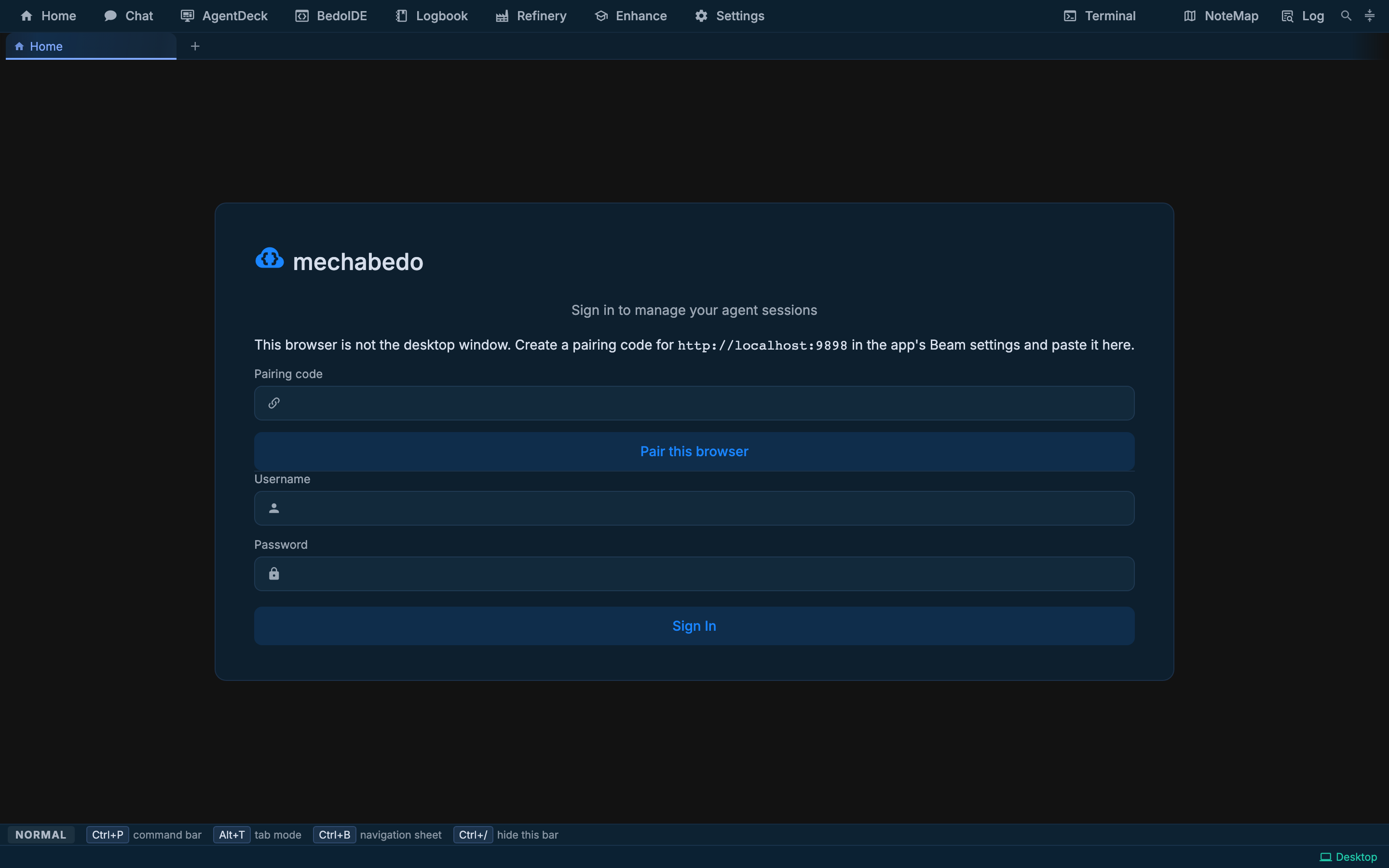
The card above is the local case - another browser on the same machine. Through a beam you get the same card asking for a real login or a one-time pairing code, and it names the machine you reached.
https://beam.example.com/__beam/go/kdlabin a browser. That sets a host-owned cookie and redirects to/; everything after it, WebSocket upgrades included, goes to that slot. Plainhttps://beam.example.com/__beam/is the front door if you would rather pick the slot from a page, and it is also what you get instead of an error when nothing is on the slot yet: leave it open and it goes in by itself once the installation connects.- Log in with the credential from the config file. A request through a beam is always treated as remote, so the credential-free local logins are closed; only a real login or a one-time pairing code gets in, and a password of
adminis refused. The sign-in card names the machine you reached, and once you are in, the window keeps saying so: a thin line along the top edge, the machine's name in the title bar, andvia beamin the status strip. Pressing that item offers Front door, back to the host's page to dial another machine, and Log out, which signs out of this machine and lands on the same page, still signed in to the fleet, so you can open another instance. /settings/bootstrapinstalls mise, node and the harnesses. They land under$HOME, which is the volume, so they survive an image upgrade./settingsfor the gateway, the loadouts and everything else. In vendor mode what the config document owns is written back on every start, so put durable deployment settings in the file rather than the UI.
From the desktop app the same instance is a row under Settings > Beam > Instances on this host, and the status bar's beam item opens it in a window of its own. With a slot token, the list shows the machines connected right now; add an offline one by its slot name. Only the host's operator token lists every configured slot.
Save that instance's login on its row and the window opens signed in. The credential is spent by this machine's server, which mints a single-use pairing code on the instance and opens the window with it, so nothing long-lived crosses; it is held in this machine's configuration beside the tunnel token and is never handed back to a browser. mise run docker up prints a container's generated login once, and that is the one to put there. If somebody is at the controls of that instance, the window opens at its login page and says so rather than taking the controls from them.
With two instances on one host, an agent in either reaches the sessions in the other: peer_list_instances names them, and the peering tools take one of those slot names as instance. What it may do there is that installation's choice, in the Peers column of Settings > Beam > Inbound from other machines:
| Level | What agents on that slot may do here |
|---|---|
| Nothing | Nothing |
| Read sessions | List and inspect sessions, and list the vApp apertures opened to peers |
| Message sessions | Also prompt or queue a message in a running session, ask through the relay, and call those apertures |
| Open sessions | Also open a new session here to answer a question |
Until you save the matrix, every slot may read, and every instance saved on this page may also message. Nobody may open a session here until you choose Open sessions for their slot, and even then only in a project this machine already knows: a pinned project, a hub project, or a directory a session here worked in. A message reaches an agent with whatever its kit allows, so give Message and Open only to your own machines. When an installation refuses, the agent is told which setting to change.
The MCP token that the agents on this machine use is never handed out through the beam, and the endpoint refuses requests that come through it.
A script names a slot with a header instead of a cookie, which is how a check reaches one:
curl -H 'x-beam-slot: kdlab' https://beam.example.com/api/healthSigning in through the fleet
When the host is set up for fleet sign-in, people sign in to the host once through the team's identity provider, and then open any installation whose owner allows it without that installation's own login. Nothing changes on an installation until its owner turns it on.
To allow it, open Settings > Beam and pick Fleet sign-in:
| Option | Who gets in through the fleet |
|---|---|
| Off | Nobody. The installation's own login is the only way in. The default |
| Fleet admins | Members the host counts as admins, with an admin session |
| Fleet members | Every member the host signs in. Admins get an admin session, everyone else a member session, which uses sessions but changes no settings, keys or pairings (Access) |
Prefer Fleet admins for now: a member's session can still run a shell as this machine's user, and every slot on a host shares one origin.
It only works when beam is on and the host address is https. Narrowing the setting later ends the fleet sessions it no longer allows, and replaces the MCP token the harnesses here use. A fleet session lasts at most twelve hours, then its member opens the machine again.
What a member sees:
https://beam.example.com/__beam/shows Sign in with the fleet. It goes to the identity provider and back.- Signed in, the same page shows their name, their role, a Sign out button and an Open link for each installation on the host.
- Open lands on that installation already signed in. The login page of an installation reached through the beam also offers Sign in with the fleet.
- If somebody else is at the controls, the login page says who, and the member can take over, the same as with a password.
An installation set to Off, or to Fleet admins for a member who is not one, shows its normal login page instead.
Fleet operations
The agents on another installation can ask this one for a few things through their fleet tools. Settings > Beam > Inbound from other machines has a row for each other installation on the host, and a Default row for any other. Each row has three columns:
- Peers: the level in the table above.
- Fleet: None, Observe (status and logs), Operate (adds restart, update and presets) or Admin (adds key requests and the API). Custom shows each operation as a switch.
- API ceiling: shown once the API is granted.
The Default row grants no fleet operations: they go to a named machine only. The operations are:
| Operation | Lets that installation |
|---|---|
| Status | Read this machine's beam link, sync, shared logbook and what it grants other machines |
| Logs | Read this machine's server log, with credentials redacted |
| Restart | Ask to restart mechabedo here |
| Update | Ask this machine to install the newest release and restart into it (Automatic updates) |
| Key requests | Ask for, or offer, a shared logbook or setup invite |
| Presets | Send loadouts to merge here |
| API | Call this machine's API within the capabilities you tick under API ceiling, observe at least |
Nothing changes until you press Save under the matrix, which saves every row at once. No peer level includes a fleet operation.
Approval says who answers that machine's granted writes here: Asks you, Auto (operations) or Auto (all but the never-list). You can't change it in the matrix. It comes from Unattended, right below. Grants you is the other direction: what that machine grants this one, as it answered just now. It says Unknown when the machine is offline or its build is older than this column.
A restart, an update, a key request, a preset or an API write still waits for you, unless this machine runs unattended for remote requests: Unattended, right below the matrix, sets the Remote half of the policy, and can set one machine apart from the rest with Always asks or Unattended. It arrives as a card of kind fleet in the approvals tray, which floats over every page, the same approvals the write gate on Settings > Platforms uses. It waits for a person whatever the gate's level. Approve for 30 min approves it and every request for the same operation from the same machine for the next half hour, so a maintenance run needs you there once rather than for every request. API writes on permission, approval and settings routes, and the ones that always wait for a person, still ask each time. The phone's Approvals offers the same as Allow for 30 min, and an open window is closed from Settings > Permissions > Allowances.
Restarting a machine
Settings > App data > Restart stops and starts this installation's server and keeps everything; every running session stops. It works through the beam too, and the page waits for the machine to answer again. An admin session may restart, a member's may not.
Agents that run the fleet
The fleet tools are a kit category of their own, mechabedo fleet. The Plus kit carries it and Lean does not (Kits). With it, an agent can read the fleet's status, its machines and a server log, restart a machine, join, leave or hand over a shared logbook, save and send presets, and create, revoke and open setup invites.
Every change asks you first, on a card in the agent's session. Allow for 30 minutes on that card lets exactly that change, named on the card, through from that session without asking until then. For a longer run, an agent can ask once with an allowance card that names everything it covers and for how long. Settings > Permissions > Allowances lists what is allowed and for how long, with Revoke, and the session's Info tab shows its own. Stopping the session's turn ends either. A change on another machine also needs that machine to grant the operation, and then waits in its approvals for its owner. When it is not granted, the agent can ask with fleet_request_grant: one card on that machine, which only a person answers. Allowing it adds the operation to this machine's row there. An invite code never reaches the agent: a tool that makes or receives one hands it a stand-in that the next tool takes once. To put a machine into a shared logbook, an agent there asks a member for a code with fleet_request_key, the member's owner approves, and the agent joins with logbook_share_join.
A session another installation opened, or one launched from a fleet member's sign-in, is not offered these tools.
Running a fleet unattended
When nobody sits at the machines, set Settings > Permissions > Unattended on each one; the Remote half is also under Unattended on this page. Remote: Operations lets the operations you granted under Inbound from other machines run without a person there; Agents: Operations lets that machine's own agents make fleet and API writes without a card. fleet_api_call is the agent's way into another machine's API, as far as that machine's API grant reaches. A deployment pins both the policy and the grants in its configuration document (Beam fleet).
Running the other end
Everything above is one installation joining a host. Running the host, and running a server-shaped installation as infrastructure, is Operating: sizing and proxying a beam host, what to back up, what to watch, and the order the two are upgraded in.
When it does not connect
| Symptom | Usually |
|---|---|
| 401 on the tunnel dial | The token is not this slot's, or the host's BEAM_SLOTS does not have it. Check the host says which of the two |
Set a password on this machine at sign-in | The password is still admin. Set another in Settings > Access on that machine, or in its config file |
is held by in the log, Beam · on <machine> in the status strip | Another machine is on a slot you named. This one keeps watching and connects when it frees; Settings > Beam has Take the slot, and Use slot to move to one of its own |
took a new id in the log | This profile was copied from another machine that is also running. This installation now counts as a machine of its own |
standing down with a protocol version | The host and this installation are different builds. Upgrade one of them; nothing else will fix it |
Nothing is on this slot in the browser | The name is right and nothing is dialing; check the installation's log. The page retries on its own |
| The browser reaches the wrong instance | The cookie is for another slot. Visit /__beam/go/<slot> again |
ws:// refused as mixed content | The proxy in front of the beam host is not setting X-Forwarded-Proto |
| The container stops at startup | The vendor config has no valid auth section, or /data is not writable by uid 1000 |
| A restart brings the container back with no beam | It was started with flags and none were repeated. mise run docker remembers them in deploy.json from the first up onwards |