
Enhance
Enhance is where you say what a session carries. Tools say what can be called; this layer says when, how and with what care, the same way for every harness mechabedo starts.
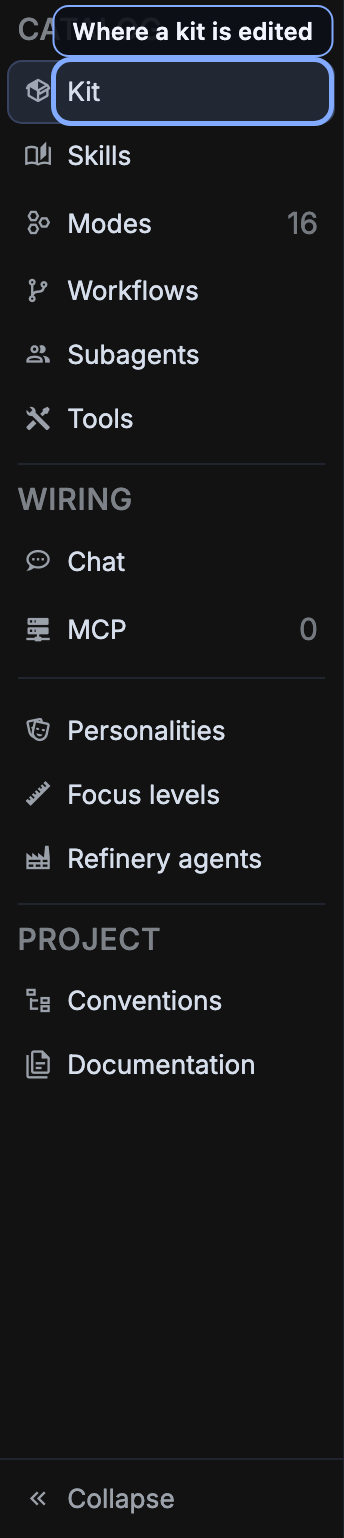
The rail is the page
There is one rail of destinations and one content pane, and the rail is the whole navigation model. Every row is linkable as ?tab=<name>, and an unrecognised name lands on Kit, which is also where /enhance opens. A row drawn indented sits under the row above it, and the header over the pane names the open destination, where it sits and what it holds.
| Group | Destination | What it holds |
|---|---|---|
| Catalog | Kit | The kit itself: its name, its voice and the brief its sessions start with |
| Catalog | Skills | The procedures a session can read, with the whole spec beside the body |
| Catalog | Subagents | The delegates a session may hand a job to, each on a loadout of its own |
| Catalog | Tools | Every offered tool by category, beside the one you selected |
| Catalog, under Tools | Custom tools | The tool projects on this machine, beside the selected one's spec |
| Catalog | Injectors | Small projects that change how a harness is started |
| Workflows | Graph runs | Which kits may start a graph, every run so far, and an example playing |
| Workflows, under Graph runs | Staged | The staged runs a prompt line can be armed with |
| Workflows, under Graph runs | Modes | Ways mechabedo supervises a session from outside its harness |
| Wiring | Chat | The kits the standalone chat runs on, which are not these kits |
| Wiring | MCP | mechabedo's own MCP server, and the HTTP MCP servers you add for the chat |
| Personalities | The voices kits, the orchestrator and the Refinery speak in | |
| Focus levels | How closely a Refinery run or a /fork summary reads a session | |
| Refinery agents | The questions a Refinery run asks of past sessions | |
| Project | Conventions | Set up a project for agents, in a session that interviews you first |
| Project | Documentation | What a project's users read, and the run that writes it |
Catalog is the kit. Every row under it edits the kit on the toolbar above the pane, the rail names that kit over the group, and no row outside it does.
Three rows carry no group, and that is deliberate. The roster is read by harness kits, chat kits, the orchestrator, the Refinery and the conventions bootstrap alike; focus levels are read by a Refinery run and by /fork on any prompt line. Filing either under Project, beside the row that dispatches into someone else's project, would say something false about its scope.
What is in the catalog
Three kinds of entry, and one context decides all three - so a harness is never taught a tool it cannot call.
Drawing the diagram…
A skill is read, not carried. A skill is a lookup, so it is one: a session is given declarations to list the skills and read one, rather than several thousand tokens of skill text in every request. A session pays for the skill it opens and nothing for the rest. Asked to make something a skill, a session writes it into the same catalog, where every later session on any harness finds it.
A subagent is a loadout and a brief. A delegate runs in a session of its own, on its own model, and only its report comes back. The reading happens somewhere cheap; the caller pays for the conclusion rather than the hundred files behind it.
Kits
A kit selects which entries a run gets. Two are seeded.
| Kit | Carries |
|---|---|
| Plus | The default: every tool and the whole staff |
| Lean | The skill repository, the archive, the network, peering, the code sandbox, and two of the staff, researcher and staff-engineer |
Duplicating a kit is the intended way to start one of your own, because nobody composes a tool table from nothing: a new kit begins as a copy of the selected one. Deleting a kit costs the reference and not the loadout; a loadout whose kit was deleted falls back to the default rather than failing to launch.
A loadout names a kit - see Loadouts and kits - and a session keeps the kit it launched with even after that kit is edited.
The kit toolbar
Above the content pane of every Catalog row sits a tinted band labelled Kit: the kit being edited, whether it is the Default that new sessions launch on (or a Make default button when it is not), Duplicate and delete, and the kit's description. Every switch below it edits that kit, and a change reaches sessions launched afterwards; a running session keeps what it started with.
The band appears over the six Catalog rows and nowhere else. The Chat destination draws the same band over the chat's own kits.
A compartment says what happens when the catalog grows
Every compartment is stored as a base and its exceptions. The base is the part worth understanding: all picks up entries added to the catalog later, none does not. The Kit destination carries a chip when the catalog has grown since the kit was last saved, so a kit that has stopped keeping up says so rather than quietly carrying less than you think.
The Kit destination, in full
Two columns. On the left the standing brief exactly as a session receives it, composed from the unsaved draft so the preview cannot drift from what is sent. On the right the fields that compose it.
Read, in the brief's bar, opens the brief over the whole window, rendered at a line length a paragraph can be read at. It is the way to review it on a small screen; Copy there takes the text as sent.
Every discrete control - the voice, the briefing level, the machine block, the force modes - flashes the passage it just moved in the document on the left, scrolled into view if it was off screen. Where a switch removed a passage there is nothing left to paint, so the gap is marked instead: no machine brief, no tool briefing.
| Field | What it decides |
|---|---|
| Identity | The kit's name, its icon and its one-sentence description |
| Voice | The roster row whose seed leads the standing brief |
| Impersonated follow-up | The roster row mechabedo writes you in when the prompt box's impersonate button is pressed |
| Environment | Whether the session is briefed on this machine |
| Project memory | Whether it opens with what earlier sessions kept for this directory |
| Prompt overrides | Force ultrathink: native reasoning off, the side-channel tool on. Force yappertron: the session reads a message as prose rather than mining it for the task inside it |
| Tool briefing | How much of the tools' own documentation the session is given |
| MCP servers | External servers handed to every session beside mechabedo's own: a stdio program with its arguments and environment, or an HTTP address with its headers. Secret values belong in a pass-through variable name rather than in the kit |
| Self-learning | Whether a pass may revise this kit from its own finished sessions |
| Autonomous drive | Sessions on this kit never wait for you: mechabedo answers every question they ask, choosing their recommended option when nothing else settles it, and sends the follow-up that serves the goal when a turn ends. Consent cards still wait for you or the unattended policy. While such a session runs, the window's corners say so: ARMED, then ENGAGED once drive has acted, a FOREVER corner when a /forever job covers it, and a tally of the sessions it started and the questions it answered. The Endeavors vApp opens beside your work and draws each driven session as a node in a living network around the drive, grouped by project, growing with what it got done and breathing while it works; hover one to read it, double-click it to open the session, drag it to pin it. The list of the same sessions sits beneath |
| Standing text | An additions-only prompt prefix, sent after the voice's seed. The row under it writes one of six registers into the field to edit from: None, Caveman, Ponytail, and ADHD at low, mid and high |
Voice
Five shipped rows, running from maximum to minimum in one direction: how much the model is asked to think, and how much it is asked to say.
| Row | Tier | The register |
|---|---|---|
| Hyperdelulu | maximum | Relentless and delighted. Chases every thread it finds |
| Hyper | elevated | Senior and dry. Minimal words, maximum signal |
| Blank | default | The model works in its own register |
| Machine | reduced | Fragments only. Facts, paths, outcomes |
| Fossil | minimum | Near-silent, and finished. The artifact is the output |
Blank is a row, not an absence. It has a seed like every other row, a kit that names nothing resolves to it, and that seed is sent. Naming nothing is what every kit mechabedo ships does.
The one place that inverts is Impersonated follow-up, where Blank means no voice: the neutral seed instructs an assistant to work the task, and an impersonated follow-up is not working the task.
Tool briefing
A declaration says a tool exists. What it is for, when to reach for it and what will bite is the briefing, and the kit says how much of it a session gets.
| Level | What the session is given |
|---|---|
off | Nothing. The tools are wired and the declarations speak for themselves |
loose | One block per tool category this kit still has tools in |
full | The same blocks, each followed by every tool in it with its own description |
The page prices all three against the local tokenizer, so the choice is a number rather than a feeling. A category with no tools left in it is never drawn, so the briefing cannot describe something this session is unable to call.
Where it arrives depends on what you are
A session mechabedo started gets the briefing in its standing brief, on whatever carrier its harness has. A caller with no session - an interactive spawn, a harness you configured by hand - has no brief, so it is handed the default kit's briefing when it connects. That is the only thing it will ever be told.
A kit that learns from its own sessions
Off by default, and off in every stored kit until you say otherwise. Switched on, a pass reads one finished session and edits what the kit carries.
Drawing the diagram…
The kit is the unit deliberately. What a session was missing is as often a tool the kit did not carry, a briefing level too thin, or a voice that suited nothing about the work, as it is a paragraph in a skill; only the kit can act on any of those.
Every write is journalled with the bytes it replaced, which is what makes writing directly safe enough to prefer over a review queue nobody empties. A run that touched one skill three times restores the state before the first touch, and a file that did not exist is removed again.
Nothing fires on its own. Each project in the session rail has a self-learning fold; Learn in its header reviews the newest finished session in that project and opens the pass while it works. /learn on a session's prompt line reviews that session instead, and anything typed after it tells the pass what to look for. The fold lists the passes made there, and the Kit destination lists the kit's recent ones. Opening one shows its summary and every change as a diff, each with Undo, and Undo all asks once before it takes the whole pass back.
A skill can refuse
Eligibility is one marker in a skill's own frontmatter, and locked is the only refusal. Everything else is eligible until you lock it. A pass stamps what it wrote, so a later pass can tell its own work from yours.
What else is in the brief
Two parts of the standing brief are composed per directory rather than per kit, which is why the page cannot preview them:
- The memory pack - what earlier sessions kept about the directory this one is about to work in, pinned by the newest
staterecord. A directory with no records composes nothing, so the switch changes nothing until somebody keeps one. See Logbook. - The documentation note - where this project's documentation is and the rule that keeps it current, for a project whose profile has its standing switch on.
And one part nobody wrote: the machine. Kernel and architecture, cores, the memory that actually binds, whether it is a container and what it is capped at, whether anything accelerates inference, and how mechabedo is running here. Then one instruction, which is to size the work to it.
A resumed session replays the brief it launched with
The composed brief is stored on the session's row and replayed verbatim, so a kit edited in between cannot change a running conversation. That is the provider's cache rule rather than a rule about kits: the system prompt of a continued conversation has to be the bytes that were cached.
Skills
The procedures a session can read when the work reaches them, each one a document with its specification beside the body.
A toggle at the head of the destination, above the kit toolbar, says which source it is showing, because there is one at a time. The two directories belong to no kit, so the toolbar goes while one of them is open:
| Source | What it reads |
|---|---|
| Mechabedo catalog | The kits, which is the rest of this page |
| User skills | ~/.agents/skills |
| Codex built-ins | Codex's own system skills |
Every session can read every skill through skill_read. A row's switch decides whether the kit also hands the file to the harness at launch, so it shows up in the harness's own skill list. Your own skills and the tool specs are switched on by default; the skills mechabedo ships are off, because they stay one read away in the repository.
The badge on a row is how often a session read the skill, across every harness in the archive: Claude Code's Skill, skill_read, Hermes' skill_view, or a shell opening the skill's SKILL.md outright, which is how Codex reads one. Its hover says in how many sessions, and the editor's header says when it was last read. Sorting the list by use puts the skills nobody opens at the bottom.
A skill a session wrote is one of your own in the catalog, with written-by naming the session in its metadata, and a session can remove it again with skill_delete. No session, and no self-learning pass, can write over a skill mechabedo ships, a tool spec, or a skill you locked, and a session rewrites one of yours only after reading it. A folder whose SKILL.md names a different skill is listed at the bottom as skipped, with the reason, rather than loaded under the other name.
Installing a skill from a repository
Many skills are published as a folder in a git repository. Install, beside New, fetches one:
- Enter the repository's https address. Add
#branch,#tagor#committo pin a version; without it the default branch is fetched. A GitHub link to the skill's folder (.../tree/main/skills/<name>) works too, and installs exactly that folder. - If the repository holds several skills, name the one you want under Skill. mechabedo looks for it in
skills/<name>/, then<name>/, then the repository's root. - Press Install. The whole folder arrives,
SKILL.mdand every file beside it, and every harness is given all of it.
The skill becomes one of your own, marked installed, with its repository, commit, path and files on its row. Update fetches it again and replaces the whole folder. If you edited the skill here since, it is marked edited here, and Update stops and names the files that changed; Replace them goes ahead and loses those edits. A name you already have is refused, unless it came from the same repository and you are updating it. Deleting an installed skill works like deleting any other of yours.
Skills other machines published are on the Marketplace page. One installed from there shows its marketplace repository and the machine that published it, and its Update pulls that repository again.
A session with configure can do the same with the skill_install tool, so you can ask a Bedo or any session to install a skill by its address. A skill's own npx skills add line is never run; this is the install.
Changing an installed skill
To adapt a skill and keep taking the original's later fixes, fork it rather than editing it in place. The installed row has three buttons:
- Fork makes a git working copy of the skill and shows its path. Edit the files there with any editor, or ask a session to.
- Publish checks the copy, commits it with the message you give, and installs it here. With a beam host that has a marketplace, it also pushes it there; turn on Listed so other machines can find it. A first publish is unlisted unless you do, and a later one keeps the listing unless you change the switch. If the installed skill was edited in place since, Publish stops and names the files, and Publish over them goes ahead.
- Merge upstream fetches the original source again and merges its changes into your copy, keeping your edits. It says when there is nothing new. When the same lines changed on both sides it stops and lists the conflicting files: resolve them in the working copy, then Publish.
Each button shows its progress and its error beside it. Sessions do the same with skill_fork, skill_publish and skill_merge_upstream. A machine that installed your skill from the marketplace takes a new version with Update there.
Graph runs
The first of the workflows, because it is the dynamic one: work split into nodes with a real order between them, a session per node, each started the moment the nodes it waits on are done. See Graph runs.
| Part | What it is for |
|---|---|
| Kits | One switch per kit. A session is offered the graph tools only on a kit that carries them; Plus does, Lean does not until you switch it on here |
| Isolation | Whether a node may work in a jj working copy of its own, on a three-way switch: None, the default, shares the directory; Offer gives a copy to a node that asks; Force gives one to every session node in a jj repository. The same setting is the graphs settings surface |
| Runs | Every run, live ones first, from the record as well as memory. Select one for its picture, every node with its report, and what was done to it; pause, stop, retry or forget it from here |
| What a run looks like | Selected when nothing else is: an eight-node rehearsal playing on a loop, one node failing so you can see what gets skipped, and a gate named Ship it? that answers itself after a moment |
Two ways to start one: arm Graph Shot, Graph True Shot or Graph Gatling on a session's prompt line, or ask a session to split its work into a graph.
Staged workflows
The staged runs a session's prompt line is armed with: an interview, an optimized prompt or a brief per agent, the dispatch, the wait and the conclusion. Graph Shot leads the list, and mechabedo writes a graph run from its prompt. Three panes: the list, the stages with every knob, and a picture of what it will do.
Modes
The named ways mechabedo drives a session from outside the harness. A session's Agent tab offers them, and a prompt line takes their commands: several commands on one line is one agent with every duty.
Three panes: the catalog, the editor, and a picture of the job the mode makes. The form in the middle is the same component a session's Agent tab fills, so the two cannot drift. Built-in modes are code; saving one writes your copy under the same command, and deleting that copy is the reset.
See The orchestrator.
Subagents
A delegate does a scoped job in a session of its own and answers with a report, so its reading never enters the caller's context.
| Field | What it decides |
|---|---|
| Loadout | The harness, model, effort and kit its own session opens on. Absent runs it as the session that delegated to it. The agent calling it may name another loadout for one run |
| Nudge | Whether a kit carrying it names it in the standing brief. Off is still callable, just not advertised |
| Description | When to delegate to it, woven into the tool's own declaration, which is how a model chooses |
| The brief | What its session opens with, ahead of the job it is handed |
A row's badge counts the jobs handed to it, through run_subagent or a harness's own spawn call naming it.
The loadout is the load-bearing field. "Which model reads a hundred files so that only the conclusion is paid for twice" is exactly what a loadout answers.
Four rules, each a refusal rather than a fallback: only a session mechabedo opened may delegate, a delegate may not delegate, four run at once across the installation, and the call blocks with a ceiling - eight minutes by default, at most thirty.
The shipped delegates are a staff of roles rather than a list of chores, since a session can already do any chore itself. What it gains from a delegate is a second pair of eyes with a different stance:
| Role | Call it for |
|---|---|
researcher | Where the relevant code is and what it already does. Runs on mechabedo fast, and the one a session is pointed at |
product-lead | The problem behind a request, and whether to grow, hold or cut its scope |
eng-manager | A plan's architecture, failure modes and test plan, before it is built |
designer | A screen or a plan for one, scored per dimension, with the generic AI look named |
staff-engineer | A change reviewed for the bugs that pass the checks |
debugger | A failure's root cause, from evidence, before anyone fixes it |
qa-lead | The change used the way its user will, with steps to reproduce what broke |
security-officer | The change's trust boundaries, threat-modelled |
Every role but the researcher runs on mechabedo think. None of them changes anything unless the job asks it to; each answers with a report.
Every harness mechabedo opens has subagents
A delegate arrives as a tool rather than as a config file, so Codex, OpenCode and maki have them too, and each one runs on the loadout you gave it rather than on whatever the calling harness would have picked. Hermes does not yet: it reaches mechabedo's tools without saying which session it is.
A kit saved with the old context-gatherer gets the researcher in its place. A Lean kit saved before the staff existed does not gain staff-engineer on its own; switch it on for that kit here.
Tools
Every tool this configuration offers, by category, beside the one you selected: its declaration, what it costs every request, how often a session called it, and the Briefing its category adds to the standing brief when the kit's tool briefing is loose or full. Categories and individual names are both switchable, a category folds away once you have read it, and a whole-list master switch and a "disable unused" action sit above them. The Chat destination draws the same list for the chat's own tools.
Other sandbox languages
Code execution runs a Python snippet over the session's own tools, in an interpreter with no filesystem, no environment and no network. Other sandbox languages is the same idea in TypeScript, Go, Rust and C#; it folds under that switch and turns on with it.
Only the TypeScript one is sandboxed. Go, Rust and C# compile and run on your machine with your own access to files and the network, which is what a harness's shell already has and what the chat otherwise has not. Each appears only when its runtime is installed, and the seeded chat kits leave them off. Switch the category off if you would rather a session only ever ran Python.
Settings
The Settings category lets a session change how mechabedo is set up: a kit, a loadout, a gateway, the terminal, the wallpaper. Every change shows on a card in the session, with each field it would change, and nothing is saved until you allow it. Permission rules, the unattended policy, the platform write gate, trust, the beam host and access are never changed this way.
Custom tools
A tool project is a small program mechabedo scaffolded under its own profile, carrying a spec that is handed to a harness as a skill. The list sits under Tools in the rail; select a project for its run line, its directory and its spec, and Open in BedoIDE to change it. Give several projects the same set when they are one tool ported across languages, and each of their specs names the others. See Tool projects.
vTools
A vTool is something mechabedo does around a session whose settings are a vApp rather than a form: the vApp is drawn here, running, and you can unlock it to rearrange it, add components, or wire it further. The vTools are the buttons on the bar above it, each saying whether it is on for the kit on the toolbar. The switch beside them turns the one you picked on or off for that kit; the vApp itself is shared by every kit. A vTool you open rather than one sessions get, such as Second opinion, has no switch. Open as vApp opens the same vApp in a tab.
A vTool's vApp cannot be deleted. Reset puts it back the way mechabedo ships it, layout and rows, including any rows you added, which is also how you get a newer layout after an update.
Turn actions is the first. Each row is one action offered under a reply once the agent hands back: its label, when it is offered (always, when the turn edited files, or when files the session touched are uncommitted), an optional draft instruction for the fast model, how many rewordings the ↻ button asks for, and the prompt a press sends, either as the next turn or into the prompt box. Select a row to edit it in the form beside the grid; Remove there asks before it removes. {{draft}}, {{files}}, {{fileCount}}, {{branch}} and {{project}} are filled in. Commit and Do I understand? ship switched on; verify and next ship switched off as examples. Do I understand? is offered after a turn that edited files: the agent asks you up to three questions about what it just changed, each asking what would happen in a concrete situation and why, and tells you plainly when an answer is wrong. An installation that already had the vTool gets the new row by adding it on the grid or with Reset. Under Behaviour, choose whether drafts are written as the turn ends or only when you press, and how much of the diff a draft reads. Recent offers lists what was drafted.
Second opinion is the second: pick a technical decision from a list of your recent work, add your own words, and ask one or more models what they think. See Second opinion.
Face input is the third: a pointer driven by an iPhone's face tracking, its calibration, and the facial movements that click. See Face input.
Injectors
An injector changes how a harness is spawned - its arguments, its environment, its ACP mode - where everything else here changes what a session is told or handed. A kit carries none until you switch one on. mechabedo ships claude-skip-permissions, which turns off Claude Code's permission prompts.
Chat
The chat has the same idea in its own vocabulary, because two of the five compartments mean something different there and one - subagents - means nothing at all. Pro and Lean are seeded, with Pro as the default and the fallback. See Chat.
MCP
Three panes:
- mechabedo's MCP server, with the tool categories it offers and the bearer a client needs
- The editor presets, for pointing Rider or VS Code at it
- Your own HTTP MCP servers, offered to sessions beside mechabedo's own
Personalities
One roster, read by harness kits, chat kits, the orchestrator, the Refinery's voices and the conventions bootstrap. A personality is one identity with two texts: the seed, which is the system prompt a chat turn or a session is opened with, and the voice, which is what an audit or conventions brief leads with.
The shipped rows are the five in the table above. They seed the table on first run and the table is the entity from then on, so editing one is editing your roster rather than overriding code.
Focus levels and Refinery agents
Two rows rather than one named Refinery, because a rail row is a subject and the depths had just stopped being the Refinery's alone. Both lists are shipped code with whatever you have written merged over them by id, yours winning; saving over a shipped id writes an override, and deleting your override is the reset.
Each keeps a draft of its own, so switching between the two never drops an unsaved brief. See Refinery.
One catalog, six deliveries
There is no single mechanism, because there is no single mechanism in the harnesses. Each takes one its own way.
Drawing the diagram…
Every kit has a tree of its own, and a session is handed its kit's: the skills the kit switches on, the tool specs and your own skills.
Two things are worth knowing about this:
- Nothing is written into your own repository or your harness's own config directory. Hermes is the closest to an exception, and it is a profile named
mechabedo, cloned from yours, so your normal Hermes use is untouched. - Tools reach every harness the same way: a per-session bearer on the MCP endpoint, rather than a file.
maki reads skills only from its own fixed directories, so it gets none of these files; it reads the same skills through skill_list and skill_read.
The dotted route on the right is for Claude Code sessions mechabedo does not start, your own terminal included: a symlink under your Claude configuration, carrying the default kit's skills. It is opt-in from the Bootstrap page, and it is global once made. A session mechabedo starts ignores it and loads its own kit's copy. The link names one profile; linking from a second profile asks before it takes the link over.
Where the standing brief rides
The voice's seed, your prefix, the force mode's instruction, the tool briefing, the delegates, the memory pack, the documentation note and the machine compose into one standing brief. It is text known before the first turn, so it goes in the harness's own system prompt wherever one can be reached.
| Harness | How it arrives |
|---|---|
| Claude Code | Appended to the system prompt over ACP |
| Qwen Code | --append-system-prompt at spawn |
| OpenCode | A per-session instructions file |
| Codex | Developer instructions, merged into the thread's config |
| Hermes, maki | No system prompt addition exists, so it rides the first user turn |
Nothing is replaced
The brief is always an addition. No route here rewrites a harness's own instructions, and that is the whole point of the shape.
Where it does have to ride a turn it is wrapped in a marker every archive reader strips, so the Logbook records it as an injection rather than as something you said. The workbench's Info tab names the voice, the brief's size and which carrier it went through, which is where "what is this session running with" is answered.
Project: Conventions
The agentic bootstrap: one setup document, dispatched into a target project as a live session that interviews you, stops for approval, and writes that project's agent knowledge. The document is editable on the page and importable from any project that already carries one.
A conventions run does not pick a personality of its own; it inherits the voice of the loadout's kit.
The same run can be started from Home, as the last step of New project. This page is where the document itself is edited, imported and restored.
Project: Documentation
What a project's users read, kept as one profile per project. Four forms, least integrated first:
| Form | What it means |
|---|---|
| None | Nothing beyond the README |
| Markdown | Plain documents in the repository |
| Document | One generated artifact, such as LaTeX or Typst |
| Site | A documentation site built by a framework - VuePress, VitePress, Docusaurus, MkDocs |
These pages are the top of that ladder.
Add a project and the page reads its directory, proposes the form and tool it finds, and fills in where the sources live and how they build. Save the profile, pick a loadout, and Run opens a session in that project which either sets the documentation up or refreshes what exists. A saved profile also answers the bootstrap's documentation question for that directory, so a Conventions run does not ask it again.
Two things keep it current afterwards, both yours to switch on:
- "Tell every session opened in this project" puts one paragraph into every session you start there: where the documentation is, update the page a user-facing change touches, and leave it alone otherwise.
/documenton a prompt line, or the Documented Shot workflow, stands a mechabedo agent on the session that asks for exactly that once the work lands.
Documenting a project walks through every way of asking.
Next
- Loadouts and kits - what names a kit
- Harnesses - what each delivery reaches
- Refinery - the agents and focus levels this page edits
- Orchestrator - what the modes drive