
BedoIDE
BedoIDE is the editor over the directories your agents work in: pick a project, browse it like an IDE, edit it with a language server behind you, see what changed, and run the command line for it. It opens from the top bar, and it is where a file path in a rendered markdown link lands when you follow one - from a conversation, a workbench, or the Logbook.
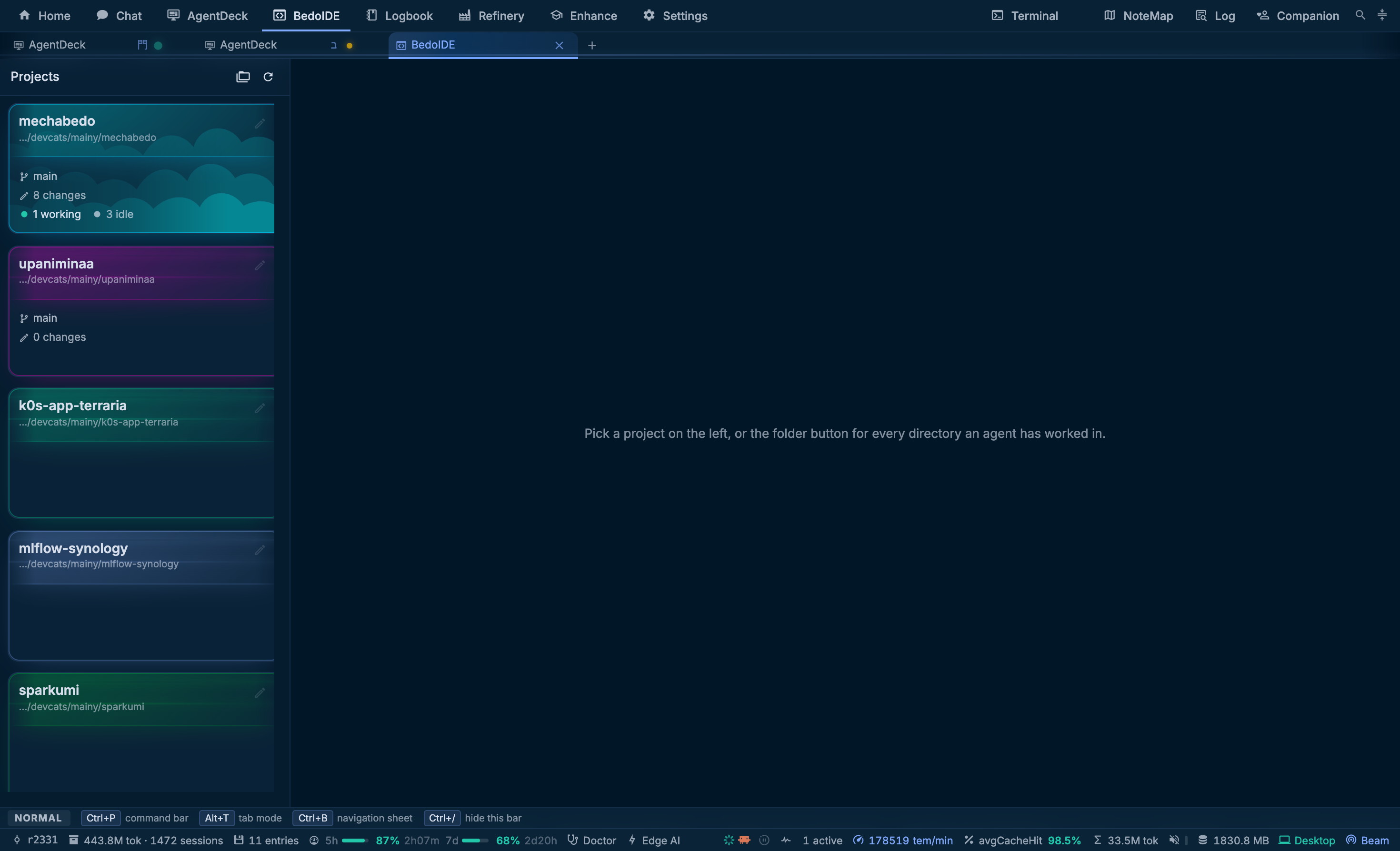
The three columns
The drawer comes first, the editor next, and the side pane last; each appears once the one before it has a selection. The drawer is not nailed to the left: Ctrl+Alt+B moves it to the other side, and so does the toggle in either header. Both arrangements are the same page turned around rather than two pages, so the editor keeps what it has open across the swap.
The drawer also doubles, into two columns, when the tree and the lists are wanted side by side. That plus the folding of single-child directories is how a deep checkout fits in 305 pixels.
The drawer
Before you pick a project the drawer holds the same cards the Home dashboard draws, so pinning a directory in either place is one act. The folder button beside them swaps to the list of every working directory this machine has, including the ones nobody pinned: the running agents on each, and what the archive remembers about it.
A third button is the filesystem itself, in the same Finder columns the Home launcher browses with. Both of the other two are lists of places an agent has worked, so this is how you reach a folder that is neither - ~/.codex, say, when you came here from a harness's config file on Settings, Loadouts.
Pick one and the drawer becomes the explorer, holding what VSCode holds in that order - open editors, changes, and the file tree - with the column's own actions right-aligned above the search bar.
Finding something
A plain query in the search bar is a fuzzy file search. Its matches hang under the bar over the editor, the basename first and the directory dimmed behind it, and the arrow keys walk them. The magnifier instead hands the whole drawer to a search pane, because a real search is four fields and a result list: include and exclude globs, case, whole word and regular expressions, and every match under the directory with the file it is in.
Replacing writes the files nobody has open on the server, and rewrites the ones you do have open in the editor instead, where the change waits behind Save with the rest of your unsaved work. Ctrl+F and Ctrl+H inside one file are Monaco's own find widget.
Right-click a row - in the tree, the open editors or the changes list - for BedoIDE's own menu: open, open changes, new file, rename, find in the folder, stage and unstage, reveal in the tree, and Copy Path or Copy Relative Path, which is what the menu is mostly for.
The editor
Monaco, with one model per open file kept until you close it, so the open editors pane behaves the way its name suggests. Ctrl+S saves.
Autosave is per filename, off until you turn it on for that name, and toggled from the chip in the editor's bar that also reports what it is doing. Turning it on for NOTES.md turns it on for every file of that name in every project: what a file is called is what says whether it is the kind of file to write without asking. A write waits for the buffer to sit still, is rescheduled rather than rushed while a revision is being typed into it, and is flushed when you switch away or close the file.
The bar also carries the file's token count and a button that reveals the file in the tree; Ctrl+Alt+R does the same from the keyboard.
Files the editor must not open
A texture, a sound, a font or a compiled blob opens as a view of itself rather than a refusal. A picture sits over a checkerboard so an alpha channel is visible, fits the column by default and zooms to 1600% with pixel steps, because a texture is pixel art until proven otherwise. Audio gets a waveform above the element's own controls, video gets the controls, a font gets a specimen of itself, and anything else gets a card naming the file and its size, whose bytes are never read. Copy Image puts a picture on the clipboard from the view or from its row in the tree.
The side pane
Beside the editor, on the far side from the drawer, is a resizable pane holding what is about the directory or the open file but is not the code. Its tabs:
| Tab | When | What it is |
|---|---|---|
| Terminal | Always | The directory's shell, a real one on the server |
| Assistant | Always | mechabedo's own agent over the directory, in the chat's own vocabulary |
| Sessions | A file is open | Archived sessions that bear on that file |
| Preview | The file is markdown | The buffer rendered, unsaved revisions included |
| Revise | The file is markdown | Ask about the file, or have it rewritten into the buffer |
A tab is mounted when you first open it and stays mounted, so switching to the assistant does not end a running rebase and switching back does not lose the conversation. The pane's width, its side and its open tab are remembered.
What changed, and the diff
One git status feeds the changes list, and it is read again every ten seconds while BedoIDE is on screen, after every save, and the moment you come back to the tab, so what an agent or a terminal did shows up without a click. Each row carries its own +added −deleted rather than an age, because what the list is scanned for is which file holds the bulk of the change. Files sit under their directories, as in VSCode's tree view: folders first, a chain of single folders shown as one row, and each folder collapsible. Inside a folder, files are ordered by name; the button in the header switches to those counts, biggest first, and then to recency. Rows carry Git's state letter in the tree too, and a count of the errors in the file when a C# solution is loaded.
The list is grouped the way VSCode groups it:
| Group | Holds |
|---|---|
| Merge conflicts | Files a merge left unresolved. Staging one marks it resolved |
| Staged | What is in the index, which is what a commit takes. Only there once something is staged |
| Changes | What the working tree holds beyond the index |
| Untracked | New files Git does not know yet |
A file you staged and then edited again has a row in Staged and a row in Changes, each with its own half of the line counts. Every row's button stages or unstages that whole file, and each group's header stages or unstages the whole group; the Staged header also opens the commit dialog.
The compare button opens the diff over the editor rather than in a column beside it, inline by default and side by side on a toggle, one diff at a time. A Staged row shows what the commit would take, HEAD against the index; any other row shows what is not staged yet. The diff's header walks the changes (Alt+F5 and Shift+Alt+F5), stages or unstages the file, and opens it. Staging from the diff turns it into the staged view of the same file. A deleted file's row opens its diff, since there is nothing left to open.
The editor keeps its models underneath, and the diff closes from the open editors row it added, like everything else open.
When a file changes under you
An open file that changes on disk, because an agent wrote it, or a pull or a branch switch did, is re-read into the editor if you have no unsaved edits in it. Your caret and scroll stay where they were, and Ctrl+Z brings the previous text back. If you do have unsaved edits, nothing is replaced: a Changed on disk chip appears beside the file name instead. Clicking it loads the disk version, and Ctrl+Z brings your edits back.
Git, without the terminal
The toolbar above the editor carries the branch and how far it is from what it tracks, as commits to push and to pull since the last fetch. Clicking the branch opens a picker that switches to or pulls any branch by name, or makes a new one. Then fetch, pull, push, which appears only when there is something to push or the branch has never been pushed, and commit. Whichever action you ran, its first line of output appears under the toolbar with the rest in its tooltip.
The commit dialog says what will land before it does: the staged files, or, with nothing staged, every change, staged for you first. It never opens empty:
- Summary is a one-line draft of the files, and it is what the box opens with, selected, so typing replaces it.
- Write from the diff has mechabedo's Fast tier write the message from the patch the commit would take, matching the repository's recent subjects. It types itself into the box, and a second press stops it.
- Last message puts the previous commit's message back.
A message you typed and then cancelled is kept for that project until it is committed. Commit commits; Commit and push pushes too, and Ctrl+Enter is that one. The count beside the buttons is the subject line's length against the 72 characters Git and every forge cut at.
A commit can also be scoped, and What to stage offers the agent knowledge
- the ADRs, the chapters, the conventions - as one pathspec. With several agents in one tree, that is how a documentation change lands without carrying their uncommitted work with it. The scope resets to the whole tree every time the dialog opens.
The editor and the Git client can also be handed off to an application on this machine, but only the ones it actually has; the button says which answered.
Problems and language servers
Hover, completion, signature help, references, rename, formatting, code actions, symbols and inlay hints come from a real language server, over a socket the server pipes to it and does not read. C# attaches per loaded solution, through the same dotnet machinery as the symbol bar; TypeScript attaches per working directory, as a Deno project's deno lsp or as tsserver, whichever the directory's own files say it is. The bar above the editor names the one that answered. F12 goes to a definition, and a file the reference points at that nobody has opened yet lands here rather than nowhere.
A C# solution also brings a Problems list, scoped three ways - File, Project, All - and defaulting to Project, because the question is what is wrong with the thing you are working on.
Writing with a model
Edit prediction offers the rest of the edit in flight, or the next edit, as you type. The edge engine answers with ghost text at the caret; a dedicated prediction model answers with an inline edit drawn as a diff. Tab takes it, Esc dismisses it, and Alt+\ asks for one now. It is off until you switch it on in Settings, because either engine spends a model on every pause in typing.
Retrack is the other direction: from a session's Overview, Retrack in BedoIDE takes every file that session edited and types the edits back into the editor, file by file, in the order the agent made them. It is a reading of what happened, not a way to undo it - nothing is written until you save - and its one Git action, Stage for commit, puts those files into the index whole.
Manual, beside the speed, stops the clock and lets you type the replay yourself: any key types the next characters, as many as the speed says - one a press at 1x, eight at 8x. The arrows, Home and End still move around, Esc leaves manual mode, and m turns it on from the keyboard. Settings > Appearance, Retrack sets the speed a replay opens at and whether it opens playing, paused or in manual mode.
Agent knowledge is just files
There is no separate knowledge view. AGENTS.md, CODESTYLE.md and .agents/** are ordinary rows in the one tree, opened into the one editor, searched by the one search. What they get is affordances on the tree that already existed:
- A token badge on every knowledge row, directories included, so what a chapter costs to carry is visible before it is loaded.
- A dot on a row the archive has history for, knowledge rows only.
- A Links section under the tree when the open file is markdown: what it points at, what points back, and which targets are dead.
The command bar
While BedoIDE is the tab in front and a directory is open, Ctrl+P is what it is in any editor: the directory's files, ranked on the basename, the open ones marked. # searches symbols, : goes to a line in the open file, and > still reaches every command in the app, BedoIDE's own among them - save, autosave for this file, close all, refresh the explorer, each side-pane tab, the folder-chain fold, the drawer's shape and side, and the handoff applications. Git actions are deliberately not in the list: a toolbar can ask before it pushes, and a fuzzy list cannot.
Settings that matter
| Surface | Contents |
|---|---|
| Settings > Appearance, Code editor | Font, size, wrapping, minimap, whitespace, and following the app palette or one uploaded theme |
| Settings > Appearance, Retrack | The speed a replay opens at, and whether it opens playing, paused or in manual mode |
| Settings > IDE, Edit prediction | The engine, the model, and what it is sent |
| Settings > IDE, TypeScript | Which server a directory attaches to when its files do not say |
Related pages: The window for the other work surfaces beside it, Tabs for what stays mounted while BedoIDE is in the background, Harnesses for the agents whose directories these are, and Enhance for what they carry.