
Settings
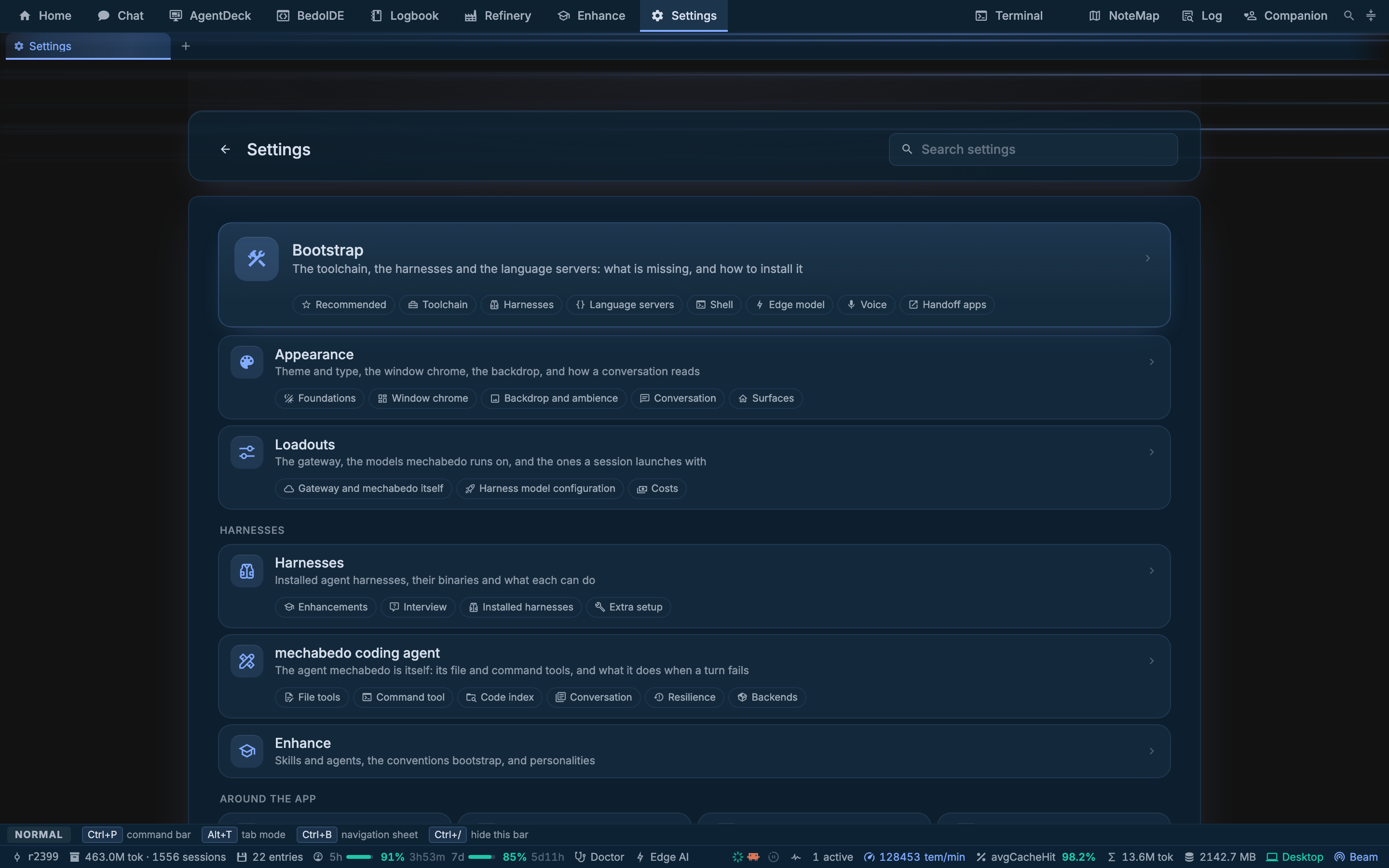
Settings is a list of pages, each a list of sections, with one search box over all of it. Typing in that box searches section titles and their helper text, so you do not have to know which page a setting lives on.
The command bar reaches the same index: Ctrl+P, then the name of a section.
A page with unsaved changes says so in both of its bars. Save in either one, or Ctrl+S, writes them; leaving in a way that would lose them asks first.
The pages
| Page | Purpose |
|---|---|
| Bootstrap | Installing the toolchain, the harnesses and the language servers |
| Loadouts | The gateway, mechabedo's four tiers, the harness loadouts, and what a model costs |
| Harnesses | Each harness's binary and environment, and what a session on it may do |
| Permissions | What a session may do without asking: the path rules, and the model that reads a call |
| mechabedo coding agent | What stands behind its file, command and code-index tools, what it does when the window fills, and how many steps a turn may take |
| Appearance | Theme, fonts, scale, which destinations the bar offers, wallpaper, motion, and how a turn is drawn |
| IDE | Which languages BedoIDE attaches a language server to, and edit prediction |
| Beam | The host this installation dials out to, who is at the controls, and pairing |
| Browser | The extension, what a harness may do in a page, and the MCP endpoint |
| Companion | The floating assistant: its loadout, its character, its voice and its schedule |
| External IDEs | Which editor a Home card opens, and editors that run an MCP server |
| Platforms | Forgejo and YouTrack, and the write gate in front of them |
| Notifications | Which session moments raise a card, and what they sound like |
| Terminal | The shell a terminal starts, inshellisense, and the font |
| Voice | The microphone, where the models run, the wake and send phrases |
| Telemetry | What leaves this machine, and this run's log |
| Profiles | Installations side by side, each with its own database and settings |
| App data | Backup, restore and wipe, taken as one unit, and the server this window talks to |
| Access | Who this session is, what each role may do, and the installation's password |
Bootstrap
The page that turns a machine into one that can open a session. Everything on it is installed with your consent, globally, into your own home directory - none of it is bundled.
Drawing the diagram…
Two curated sets sit at the top, because the rows below need each other in an order nobody tells you: Minimal is a machine that can open a session. Full adds every remaining harness.
A member already present contributes no step, so the card can say 9 of 11 here before you open anything, and a second run is a no-op rather than a reinstall. A member that fails is reported and stepped over, and the verification pass names what did not land rather than reporting success.
The dotted rows are deliberately outside both sets. Each is minutes or gigabytes and none is needed to open a session.
The Codex card also carries a DeepSeek action, for pointing Codex at deepseek-flash with the setup script DeepSeek publishes. The dialog can run it against DeepSeek's own API, against one of the gateways you configured for chat, or against the default gateway chat itself runs on. A gateway the dialog offers is one whose key is not shaped like a DeepSeek one, and the default gateway is listed only while it serves deepseek-flash.
Codex starts a background app-server on its own since 0.157, one that outlives its window and updates itself (openai/codex#48195). mechabedo turns it off whenever it installs, updates or reconfigures Codex, and the Codex card shows Background daemon with a Turn off button while it is still on. That button also stops a daemon already running and deletes the copy of Codex it ran from. Every Codex terminal mechabedo opens is told not to start one anyway.
What the page says about your machine
One line above the sections: the kernel, the cores, the memory, the GPU, and a chip when you are in a container. Half this page only means something against it, and the edge model means nothing at all on a machine that cannot hold one.
The edge model
The model your own machine runs, behind the Edge tier. The card offers a table of choices with what each costs, against the machine line above it, and a link field for anything not in the table.
| Model | For | Disk | Memory | Context | BFCL v4 |
|---|---|---|---|---|---|
| Qwen3.8-2B Distill, Q6_K | Answers. The default: a reasoning model, so replies open with a think block | 1.6 GB | 2.2 GB | 256k | not published |
| MiniCPM5-2B, Q4_K_M | Answers. Tool calls and long context | 1.6 GB | 2.1 GB | 128k | 66.6 |
| MiniCPM5-2B DSpark, BF16 | Drafts for MiniCPM5-2B: the same reply, fewer passes of the big model | 653 MB | 750 MB | 12k | n/a |
Memory is the weights plus the cache at the default context; every other number is the publisher's own. A draft is loaded beside the model it drafts for, so the two are paid together.
Loadouts
Where the vocabulary in Loadouts and kits is edited.
| Section | Contents |
|---|---|
| Gateway | The OpenAI-compatible endpoints every model on this page is reached through. The first is the master gateway and its models keep their bare ids |
| mechabedo | The four tiers, plus the vision tier that reads images |
| Personality | The voice every orchestrator run speaks in |
| Harnesses | Your saved loadouts, offered on the launch bar and by name in the chat |
| Claude Code models | Which aliases a Claude Code loadout's model field takes, and which of them pin a model |
| Model rates | Dollars per million tokens. A rate covers every identifier listed against it, and every cost mechabedo shows is recomputed from these. The Currencies fold under it picks the currency those costs are said in |
The first model you pick from the list for a tier that has none saves by itself, and the bar says so. After that, changing it waits for Save.
opusplan does not pin what its name suggests
It is a CLI behaviour rather than a model, and it resolves onto plain opus. The page marks that per row rather than implying every alias pins exactly.
Harnesses
One card per harness: its binary, the environment variables it reads, what a session on it can do, and whether its ACP route is ready.
Two switches above them are worth knowing:
- Enhancements, whether a harness mechabedo starts is given the enabled skills, agents and tools from the Enhance catalog.
- Interview, what mechabedo adds to the questions a session puts to you.
Permissions
Off until you turn it on. With it on, every tool call a session asks permission for is read into an operation and a path, matched against your rules, and allowed, refused, or put in front of you as a card in the conversation.
| Section | Contents |
|---|---|
| Unattended | What this machine answers without a person, for its own agents and for other installations, and what it answered |
| The gate | Whether it decides anything, what a call no rule covers gets, and the two confidence thresholds |
| Rules | An ordered table of path patterns. The first one that covers a path decides it, so a narrow rule sits above a broad one |
| Needle | The 121M model that reads a call carrying no path of its own. About 36 MB, downloaded when you ask for it, and it runs here |
| Try a call | One command through the reader and your saved rules, deciding nothing and asking nobody |
| Allowances | Writes a session may make without a card for a while, and fleet requests approved for a while |
| Recent decisions | What the gate has decided since the server started |
A rule is a glob over a path, the operations it covers, and one of Allow, Ask me or Deny. The editor says what your pattern means in words and lets you try a path against it, so a pattern is something you can check rather than hope about. /Users/you/project/** covers that directory and everything below it.
A verdict is acted on only when the reading is confident enough. Under the threshold the call comes to you instead, and a call nothing could read is never allowed on its own. Raising a threshold removes wrong decisions first and costs you questions second, which is why Try a call is there: pick the numbers by looking.
A session that is refused can ask you for a rule. It arrives as a consent card in the conversation: the rule it wants, what the pattern means, why it says it needs it, and what was refused. Only you answer it; an orchestrator job told to answer for you does not see it. Your yes puts that rule at the top of your table, where it decides before your own rules, with the session's own sentence as its note; anything else leaves the table alone. A session cannot turn the gate off, move a threshold, or change a rule you wrote, and it cannot ask for everything at once. A rule you granted this way is an ordinary rule, so delete it when the work it was for is done.
Start from the suggested set begins with rules that refuse every agent access to mechabedo's own settings files: server.jsonc, beam-logbook.json, fleet-jti.json and pending-credentials.json. The first of them holds the key that signs an admin session. The patterns match those file names in any directory, so narrow them if a project of yours has a file by one of those names.
Unattended
For a machine nobody sits at. Each half is Off, Operations or Full:
| Half | Operations | Full adds |
|---|---|---|
| Agents, this machine's own sessions | Fleet writes and API writes run without a card | Every other card you could answer with a click, the gate's "ask me" for a harness's tool calls, and the human step of the platform write gate |
| Remote, other installations | A granted restart, key request, preset or API write runs without you here | Granted API writes on permission, approval and settings routes |
| Rooms, sessions a Bedo thread opened here | Fleet writes and API writes run without a card, within what the conversation's owner may do | Every other card, and the gate's "ask me": the agent does whatever its owner may |
Under Remote, Per machine sets one installation apart from the rest: Always asks keeps its requests waiting for you whatever Remote says, and Unattended answers them at Operations, or Full while Remote is Full. The Approval column under Inbound from other machines shows the result.
End makes it lapse on its own: 8 hours, 24 hours, 7 days, or until you change it. Unlike an allowance it survives a restart.
It never goes beyond what a session's launcher holds, so a member's session gets nothing a member could not do. A deny rule still denies. A key you would type, the sign-in settings, this policy itself, and wiping or restoring the app always wait for you. Only a person holding every capability sets it, here or through the beam; no agent can, with or without a card. Answered lists what it let through since the server started, and every answer is also a line in the server log.
A deployment can pin it instead, with MECHABEDO_UNATTENDED, such as agents=operations,remote=operations,rooms=full, or an unattended section in its configuration document. The page then shows it and cannot change it.
It only sees the calls a harness asks about
Claude Code and maki ask. Codex is started with approvals bypassed and asks about nothing, so its calls never reach the gate. This is not a sandbox.
Companion
The companion is off until you turn on Spawn the companion. Nothing about it loads before that.
Once it is on, it wears Popo, the character that ships with the app, unless you pick another under Character model. Popo ships twice: Popo (built in, 3D) is the default, a still 3D figure you can turn by dragging, and Popo (built in, Live2D) is the same rabbit drawn flat, which blinks, breathes, nods and takes expressions when the companion acts out a mood. Neither can be deleted; No model turns the character off and leaves the conversation. Uploaded Live2D and VRM models are listed beside them. A VRM character walks in from the side of its window when it loads, unless you turn off Walk in from the side, and its eyes follow your pointer over it. The prompt box is always there, under the character when it has the window to itself.
Endeavors decides what it does when an endeavor moves. Follow endeavors, on by default, writes a line in its conversation and has a VRM character gesture. Say them out loud speaks a couple of those lines at a time. Window has the button that moves it into a tab or back into its own window.
With no cloned voice picked under Speech, either Popo speaks in a voice cloned from its own sample the first time a reply is read out, and that clone joins your voice library. A voice you pick always wins, and a machine that cannot clone a voice uses the voice host's own.
Profiles, and App data
A profile is one installation: a directory under the mechabedo home holding a database, a settings tree and its downloaded sources. A new one starts empty, so its first launch is a first launch.
One process holds one profile. A second start on the same profile refuses and names the one in the way, which is why running two at once is a deliberate act rather than an accident.
App data is backup, restore and wipe. The database and the settings directory are one unit and are always taken together: restoring half of them produces a state that never existed. A backup is a timestamped directory holding a manifest, the database as a dump taken through PGlite's own exporter, and a file-for-file copy of the settings.
A restore or a wipe asked for while a server holds the profile is parked and applied at the next start, rather than pulled out from under a running process. Both are done on the machine itself: through the beam the two buttons are disabled, because either one quits the app and nothing remote could start it again.
Server connection, folded away at the bottom of App data, is the server URL and auth token this window talks to. The app finds its own server, so it is set by hand only to drive one running on another machine.
Access
Every sign-in is one of two roles. The window on this machine, a device you paired with its QR code, the password, and a fleet admin are an admin. A fleet member, and an OIDC account in the deployment's allowed groups, is a member.
What a role may do is five capabilities, and every protected route needs one of them to read and one to write:
| Capability | Covers | Admin | Member |
|---|---|---|---|
observe | Reads that reveal no secret | yes | yes |
operate | Sessions, harnesses, terminals, files, graphs | yes | yes |
configure | Settings that hold no key | yes | |
keys | Credentials, pairing, device keys, the database | yes | |
maintain | Backup, restore, wipe, profiles, installs | yes |
A member is refused the rest with 403. Because the app's own database needs keys, a member's window shows sessions but not the settings stored there. Under the table, Members hold narrows members to observe alone, or gives them observe + operate again.
A session is offered tools by what whoever launched it may do, as well as by its kit. A member's session gets no tool that needs configure or keys, so no window control, no permission request and no key tool. A session another installation opened over the beam gets no terminal, window, peering or vApp tool at all.
operate includes a shell as this machine's user, and that user can read the installation's settings, so a member who holds it is as trusted as an admin on this machine. Give it only to people you would give the machine to.
The sidecar holds its role's set without configure and maintain, and reaches only the routes the phone uses.
Revocation has two controls:
- Sign everyone out ends every session signed in to this installation: browsers, phones and fleet members all sign in again. This window gets a new session and stays signed in. It is only in this machine's own window.
- Rotate MCP token replaces the token harnesses reach mechabedo's tools with. Sessions mechabedo opens have their own token and carry on; the page lists what keeps the old one until it restarts, such as running OpenCode workspaces. The token also rotates by itself when you narrow who may sign in through the fleet.
The password is the one the login page checks. A desktop installation starts with one nobody knows, since its window signs in without one; set your own here before you sign in with a password from elsewhere. A served installation starts with admin, and a password sign-in through the beam is refused until it is changed. The window sets it outright; any other admin session on this machine gives the current one first.
Telemetry
Two halves, and the page keeps them apart.
What leaves this machine is the export: every log record leaves as an OpenTelemetry log record, with its properties as attributes and its trace attached, when you configure an exporter. Beside it is the startup ping - one anonymous message when the server starts. MECHABEDO_ANALYTICS=off and DO_NOT_TRACK both turn it off.
This run is the log file itself, tailing, one file per run and the twenty most recent kept. The same log is on the Log press in the top bar.
Next
- Loadouts and kits - what the Loadouts page is configuring
- Enhance - the catalog the Harnesses page's Enhancements switch delivers
- Beam - what the Beam page connects to