
Home
Home is the dashboard and the launcher. It answers two questions: what is running right now, and start something new, where.
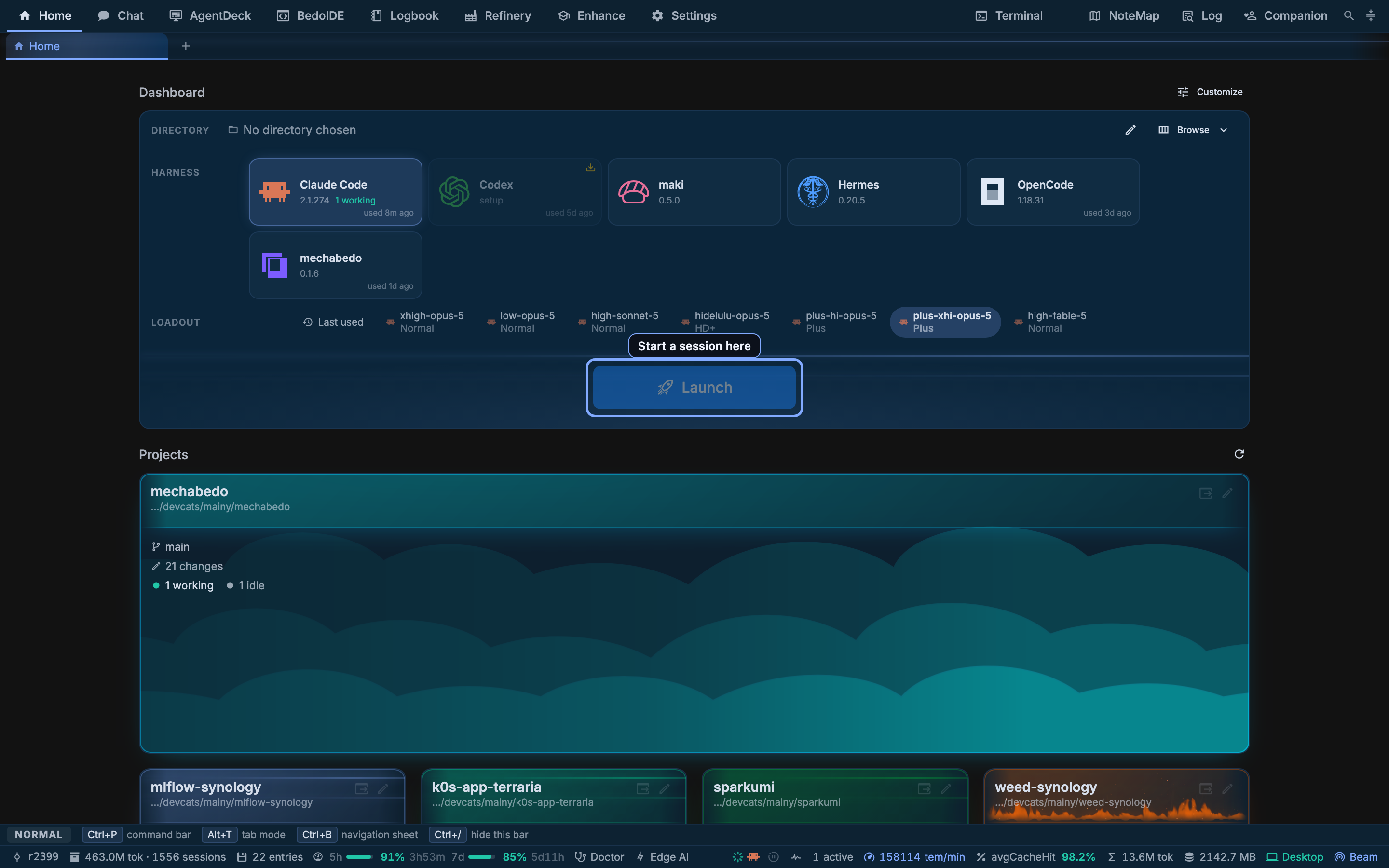
The launcher
One bar, read left to right and top to bottom. Every row narrows the next one.
Drawing the diagram…
Directory is a breadcrumb you can click through, a path you can type, or Browse for a picker, which opens below the row at its own height. A hidden-folders switch sits beside it, and New folder makes one in the directory on screen and moves there, so a project that does not exist yet can be started from this row. The directory is remembered, so the common case is that it is already right.
Harness is a tile per agent, with the version it detected and when you last used it. A harness that cannot open a session wears an install badge and sends you to Bootstrap instead of being selectable; the Launch button stays disabled while an unready one is picked. A new profile shows three tiles, Claude Code, mechabedo and Codex, whether they are installed or not; the others are switched on, and the order changed, under Settings > Appearance.
Loadout is a pill row. Each pill names the loadout and, under it, the kit it carries. Last used launches on whatever this harness last ran, which is the pill to reach for when you do not want to think about it. Picking a loadout also picks its harness, because a loadout belongs to one - see Loadouts and kits.
Launch names the directory it will launch in, so the button itself is the last chance to notice you are in the wrong place.
The hub directory
Some work has no project: setting something up on this machine, or a change that spans several projects. The faint Use hub directory? chip under the button is for that. It clears the directory and the button reads Launch via hub. Press the chip again, or pick any directory, to go back.
The hub is a directory mechabedo keeps for you under ~/.mechabedo, and rebuilds every time you launch there:
| In the hub | What it holds |
|---|---|
projects/ | A link to each pinned project, each recent one, and each one the hub started |
AGENTS.md | What the agent is told: this machine's system, desktop, shell and package managers, the projects with a note on each, such as a network share being slow, and your other machines when beam knows them |
notes/ | Yours and the agent's: files and scripts a later hub session should have. mechabedo never rewrites it |
bin/new-project | Starts a project next to a linked one, with that project's basic conventions copied in |
bin/new-project <name> --beside <link> makes the folder in the same directory as the linked project. It copies the style guide, the editor, formatter and git settings, the wording rules, and the .agents/ setup, and starts a git repository when the neighbour is one. The new project is linked straight away. Its project conventions setup resumes from the neighbour's answers rather than from scratch.
With beam on and another machine on the same beam host, AGENTS.md also has a Fleet table: each machine, whether it is online or when it was last seen, its build, when it last synced the shared logbook, and its recent projects. It tells the agent to reach another machine with ask_mechabedo or peer_ask_session. A fact about a machine, such as where a service keeps its data, is kept in curated memory scoped to that machine, so hub sessions on every machine find it.
On Windows the links are junctions, or symbolic links for network paths, which need Developer Mode. Where neither works, the agent is given the path instead.
Handing it to a Bedo
With Bedos on, a second chip, Hand to a Bedo, sits beside the hub chip. Pressed, the launch becomes a message in your thread with a Bedo, the Chief Bedo unless you pick another, naming the directory and the loadout you picked. The Bedo starts the session as a task, and you land in the thread, where its task card links to it.
Projects
Under the launcher, one card per directory mechabedo has seen an agent work in.
A card carries the project's name and path, its branch, how many changes are uncommitted, and how many sessions in it are working against how many are idle. The wave under a card is the project's own colour; the pencil renames it and picks that colour.
Clicking a card launches in it with the dashboard's current loadout, so the grid is the fast path once your projects are set up.
New project
A card appears here once an agent has worked in a directory. New project, in the grid's header, is the way in before that: a directory you have just made, or one mechabedo has never seen.
It is three steps in one window, and only the first is required.
| Step | What it asks |
|---|---|
| Directory | Where the project lives, in the same Finder browser the launcher uses, with a New folder button for one that does not exist yet |
| Card | Whether it gets a card on Home, and what that card looks like: the name, icon, colour, band and cell of the pin dialog |
| Conventions | Whether to run the agentic bootstrap in it straight away, on a loadout you pick, with the same steering and supervision switches the Enhance page has |
Create project does whatever the switches asked for and selects the directory in the launcher either way, so the project is one press from a session even with both switches off. With the bootstrap on, it opens the session it dispatched in a new tab, and that session runs the interview.
Arranging Home
Home is laid out like a vApp, because it is one. The lock in its top right corner unlocks it: every tile can then be dragged and resized from its corner, and the name in its top left opens its settings, where it can also be duplicated or deleted. The bar above the grid has Element, which adds a tile, the width, and Lock, which puts it back to use. A card follows its tile's height: its title stays put and its contents scroll, and a taller launcher gives the extra room to the launch button. The layout saves as you go.
| Component | Contents |
|---|---|
| Launcher | The bar above |
| Projects | The project grid |
| Harness status | Every harness session on this machine, including ones you started in a terminal, with the agents supervising them |
| Claude status | The vendor's own incident feed |
| Claude usage | How much of the session and weekly windows is spent |
| Resources | The machine's CPU and mechabedo's memory over the last two minutes, split into server, PGlite, renderer, helpers, harnesses and tools. The list button opens the Task Manager |
Any other vApp component can go on Home too, a result grid over rows of your own or a web frame, and these six can go on any vApp. The width is a slider with Narrow, Medium, Wide and Full beside it; the grid centres within it, and its last stop is the whole window. That is what the old dashboard's width slider became. The columns, gutters and backstage a vApp has are left out of Home, since arranging a dashboard needs none of them.
Claude status and Claude usage are on Home only when this machine has a Claude Code login. Log in with claude later and they appear under the other tiles the next time Home opens. They are added once, so a tile you remove stays removed.
If you had customized the old widget dashboard, Home opens the way you left it: a hidden widget is not placed, a wide one spans the grid, and the width carries over.
The arrangement is stored with the profile, so it survives a restart and travels with a beam-reached instance.
Harness status
Worth calling out, because it is the card people are surprised by: a harness you started yourself, in your own terminal, appears here. mechabedo scans the process table and joins what it finds with the token meter and the transcript archive, so the session shows its rate and its archive rows without ever having been launched from this page.
The counts in the title are sessions by status: working, waiting, idle, and the agents still active. Working sessions come first, with their tokens per minute; the rest show how long ago they started. Each row shows its CPU and memory, counting the processes under the session, and the chart button opens Resources. A robot on a row means an agent supervises that session. Hover a row for its directory, pid and start time, and for the button that kills it. Under the sessions, Agents lists the orchestrator jobs with run now and cancel, and Relay trails appears once one session has asked another something.
A Home that had the old Running sessions and Orchestrator agents tiles shows this one in their place.
The bar above, and the strip under it
The band along the very top carries the destinations - Home, Chat, AgentDeck, BedoIDE, Logbook, Refinery, Enhance, Settings - and on the right the floating surfaces: Terminal, NoteMap, Log and Companion. The strip under it is your open tabs.
The strip along the bottom is the status bar. It is dense on purpose; The window reads it item by item.
Next
- Loadouts and kits - what the pill you just picked actually decided
- AgentDeck - where the session you launched appears
- The window - the chrome around all of this