
Loadouts and kits
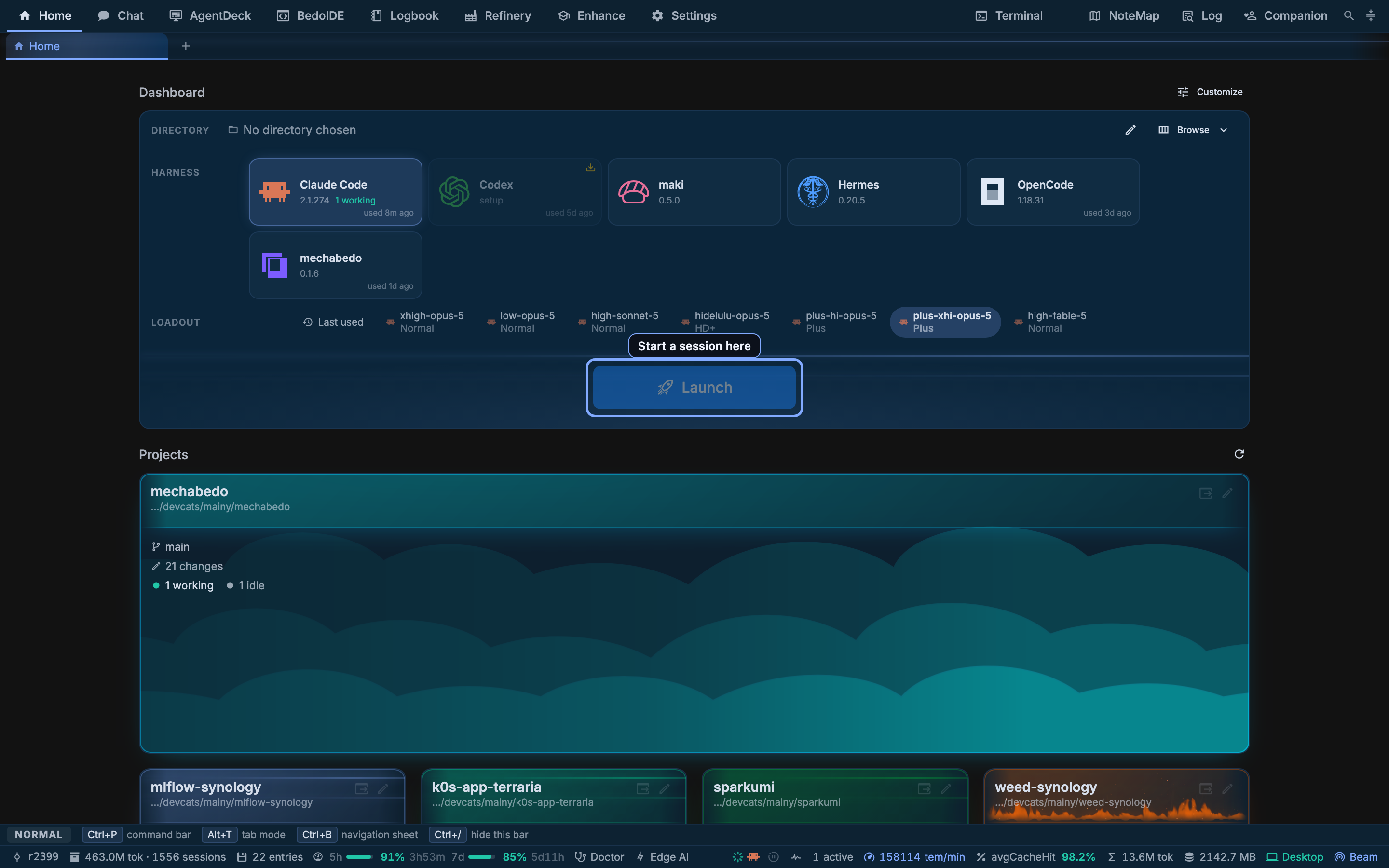
A loadout is a saved answer to one question: which agent, on which model, thinking how hard, carrying what. It is the only way to choose a model here. A prompt names a loadout and nothing else.
This page is the one to read if the vocabulary on the Home launcher is not obvious yet. Everything else in mechabedo assumes it.
The four things a loadout holds
Drawing the diagram…
Pick one on the Home launcher and all four are decided at once. Picking a loadout also selects its harness, because a loadout belongs to one.
What a kit carries
The kit is the half people underestimate. It is what a session knows and what it is allowed to reach, and it is the same idea whichever harness runs.
Drawing the diagram…
Two kits are seeded. Plus is the default and carries everything. Lean carries the skill repository, the archive, the network, mechabedo peering and the code sandbox. Your own kits are made on the Enhance page, and duplicating one is the intended way to start.
A kit may also carry external MCP servers: a stdio program with its arguments and environment, or an HTTP address with its headers. Every session the kit opens is handed them beside mechabedo's own tools, on the harness's own MCP channel; a name mechabedo already uses is dropped rather than shadowing it. Anything secret belongs in a pass-through variable name (envFrom for a stdio server, bearerEnv for an HTTP one) read from the session manager's own environment, rather than a literal stored in the kit. A kit cannot set or read PATH, HOME and the like, or any MECHABEDO_ or CODEX_ variable.
A kit is never a replacement
mechabedo's standing brief is delivered as an addition to the harness's own system prompt where one can be reached, and in front of the first user turn where none can. A harness's own instructions are never overwritten.
The whole path, from picking a loadout to a working agent
Drawing the diagram…
Three things in that sequence are worth knowing, because they are where a launch can surprise you:
- The model call goes before the effort call. Effort options depend on the chosen model, so the model has to land first.
- The effort is re-resolved, not sent blind. Your five levels are mechabedo's vocabulary. An agent may offer two names instead, or none at all. The nearest level is used, ties going to the stronger one, and a model offering no effort simply gets no call.
- A failed apply fails the launch. A session that opened on the wrong model is not what the loadout promised, so it is not offered to you at all.
Two kinds of loadout
The set of one is closed; the set of the other is yours.
| mechabedo's own | Harness loadouts | |
|---|---|---|
| The set | Fixed: auto, fast, edge, think | Open; you write them |
| What runs on it | The chat, the orchestrator's decisions, the Refinery's preparing pass, subagents, and the rating of every question a session asks you | A session you open |
| Where it is edited | Settings, Chat, as model tiers | Settings, Loadouts |
Drawing the diagram…
think is also a launch target: mechabedo is a harness of its own, so mechabedo:think is something you can open a session on, and it is what a fresh installation offers before you have written a loadout of your own.
Once the Think and Fast models are both set, mechabedo writes two loadouts of your own for its coding agent: mbc-think-plus on the Think model and mbc-fast-plus on the Fast one, both on the Plus kit at effort medium. They are ordinary rows you can edit, rename or delete, and they are written once, so a deleted one stays gone. The Bedos answer on mbc-think-plus unless you pick another default.
The Edge tier is not a smaller cloud model
edge is the tier for work where answering quickly is the requirement rather than answering well: a spoken command turned into an action, a title, a suggestion offered while you are still typing. It runs locally.
Effort is one list
low, medium, high, xhigh, max. Five levels, everywhere in the app, on every harness and on the chat's tiers alike. What differs is where the level lands: a spawn argument for one harness, a config call for another, a settings file for a third.
A level a harness does not recognise is dropped rather than sinking the loadout. A typo costs the level it names, not the model beside it.
Which models a harness can run
A harness model id is an opaque string and every harness spells it differently, so Settings, Loadouts carries a section per harness under Harness model configuration.
Four of them can be asked outright, and the Ask button in the section header does it: maki, OpenCode and Codex each have a listing command of their own, and mechabedo's models are the gateways above. Clicking a model there adds a loadout already on it.
Every section also carries the path of that harness's own config file, in monospace beside a terminal mark. Clicking it opens the file in BedoIDE, on the folder it sits in:
| Harness | File |
|---|---|
| Codex | ~/.codex/config.toml |
| Claude Code | ~/.claude/settings.json |
| OpenCode | ~/.config/opencode/opencode.json |
| Qwen Code | ~/.qwen/settings.json |
| maki | ~/.maki/providers.toml |
| Hermes | ~/.hermes/config.yaml |
That is the way through wherever the list is narrower than the file. Codex is the one worth knowing about: codex debug models answers with the catalog your account reaches, so a provider you configured yourself in config.toml is not in it, and a loadout on one of its models has to be typed rather than picked. Claude Code and Qwen Code are not asked at all yet; their fields are free text.
The file may not be there yet
A harness that has never written its config file still gets the button, marked not written yet. BedoIDE opens the folder it belongs in, which is how you create one.
Where the model actually comes from
Every model mechabedo's own tiers use is reached through an OpenAI-compatible gateway, and there can be several.
Drawing the diagram…
Two rules fall out of this and both matter in practice:
- The browser bundle carries no gateway credential. A
VITE_variable is a literal in every build, so the key is the server's and the browser is proxied through it. - A harness brings its own subscription. Claude Code signs in as Claude Code. The gateway above is what mechabedo's own agents use, not what your harnesses use, unless you pointed them at it yourself.
Choosing one
| Surface | Method |
|---|---|
| Home launcher | A loadout row under the harness tiles, plus a Default pill. Both are remembered |
| Project cards | Whatever the dashboard has selected |
| The chat's tools | list_loadouts reports each one's kit; then a loadout name on launch_agent, open_session, ask_session or a graph node |
| An agent in a session | The same list_loadouts and launch_agent, and a loadout name on ask_mechabedo, run_subagent, a graph node, or /spawn loadout:<name> in an operation mode chain. session_self tells it which loadout it runs on itself, so "a session on the same loadout" works |
| Either prompt line | /model, which moves the conversation it is typed in rather than opening a new one |
| A workflow's fleet stage | inherit, ask, or a loadout written out |
Every surface lists the same menu: your saved loadouts, then mechabedo's own four. Only mechabedo think opens a session of its own. The other three take handed-out work, a subagent or a graph node, so an agent can put a small job on mechabedo fast without spending its own model on it.
When an agent opens a session through ask_mechabedo or launch_agent without naming a loadout, the session opens on the loadout you have used most and most recently on that machine. If you have no history there, it opens on your first saved one. An agent may also name one loosely, by a word from its name, its model or its harness, and the closest saved loadout is used.
A loadout is the only way a model can name a model. The chat's tools take a loadout name and nothing else: no model, no effort, no kit, no combination. An unrecognised name comes back with the list of real ones rather than quietly launching on defaults.
So "use the high-sonnet-5 loadout" works. "Use your judgment for the loadout" works, against a menu you approved. "Use opus with a 64k thinking budget" is answered by pointing at the settings page - which is the point. The constraint is on what a model may ask for, never on what you may type.
Presets
A preset is a named set of loadouts you can add in one go. Settings > Loadouts > Presets lists them:
- Claude Code, Opus 5.5 on Plus ships with mechabedo: Opus 5.5 at low, medium, high, xhigh and max, each on the Plus kit.
- Your own: tick the loadouts you have saved, name the set, and press Save preset.
Apply adds the preset's loadouts. One with the same name and harness as a loadout you already have replaces it, so applying a preset twice changes nothing. Loadouts the preset does not name are left alone. Save or discard any loadout edits on the page first.
To bring presets, loadouts and the kits they use to another machine, use a setup invite (Beam). It carries a key only where you choose to; the other machine keeps its own, or lists the ones it still needs under Settings > Beam > Machine setup.
What it costs
The workbench's Overview tab prices the session you are looking at: the loadout, model and kit it is on, the context it holds against the window, and what the last turn cost split into fresh input, cache read, cache write and output.
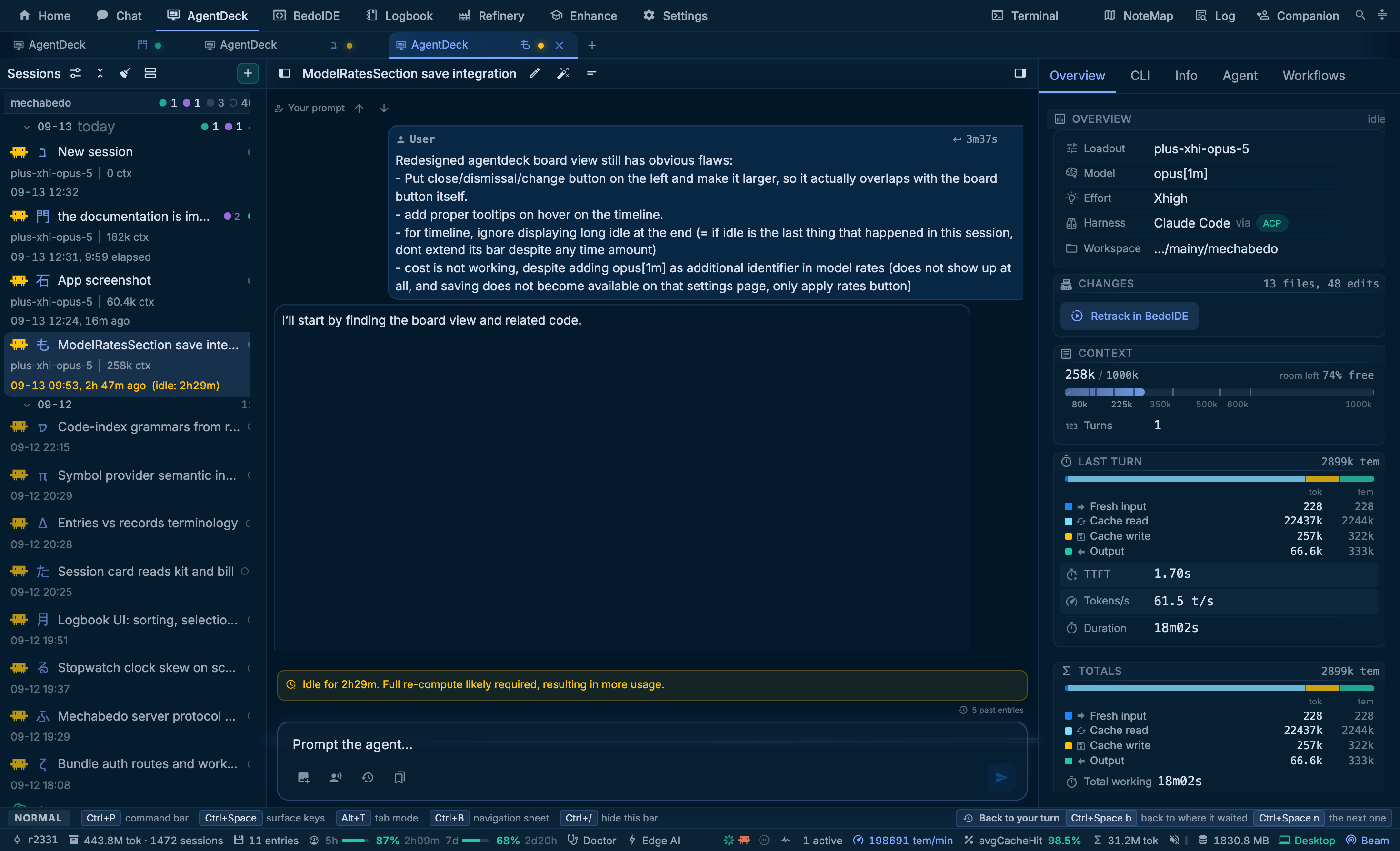
A cache read is not a fresh read, and the split is there because the difference is most of the bill.
The prices themselves live under Settings, Loadouts, Model rates, in dollars per million tokens. The Currencies fold under that table picks the currency every cost is said in, from a shipped list of euro, yen, renminbi and Australian dollar at the European Central Bank's reference rates. The rates are yours to correct, and whatever you pick is what the Logbook, the subscription page, the board's roofs, totals and inspect card, and an exported report all read in.
Related
- Harnesses - what each agent is, and the gate in front of it
- Enhance - where kits are made, and what an entry actually is
- The workbench -
/modeland the Overview tab