
The window
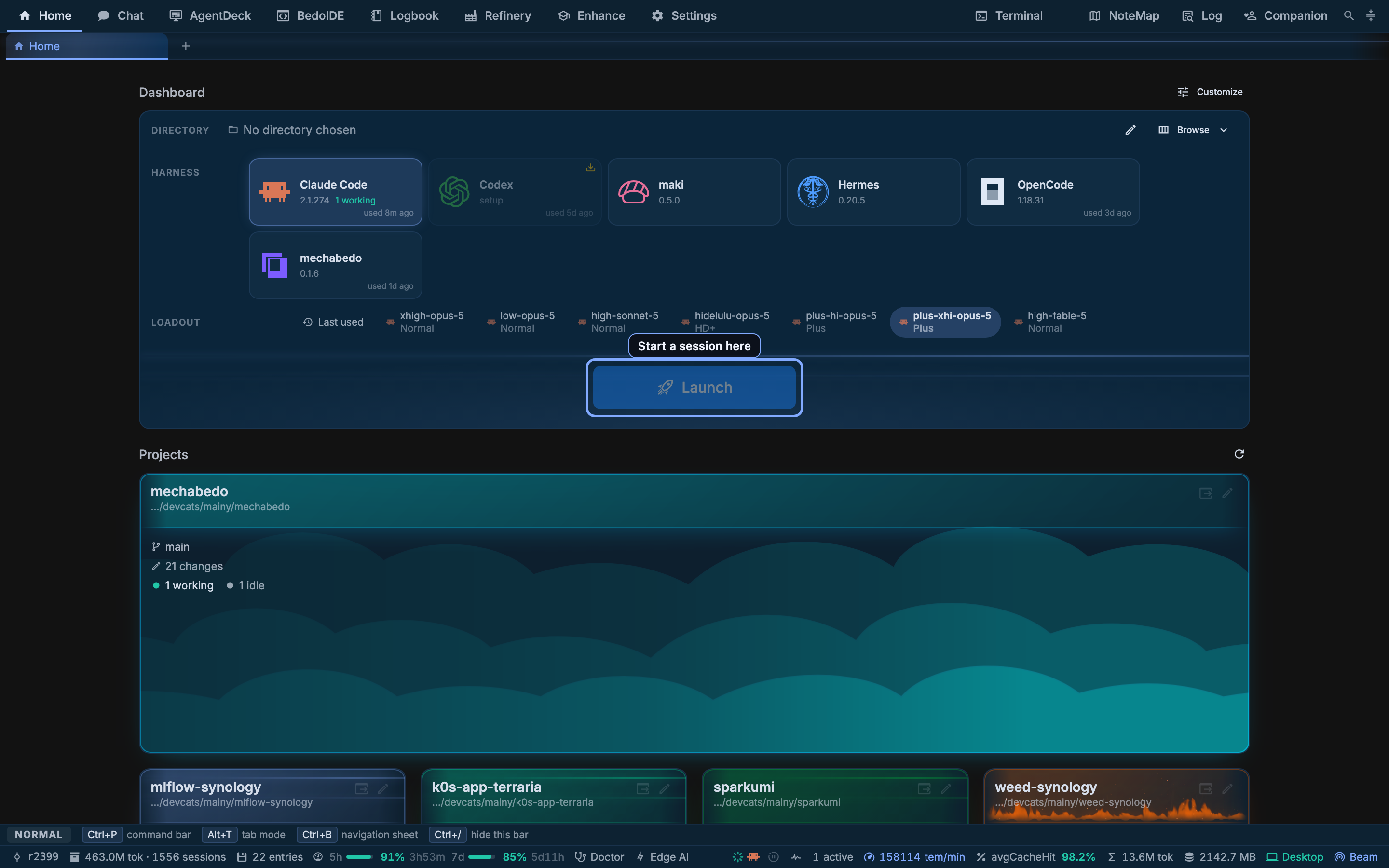
Everything in mechabedo happens in one window, and the chrome around the page is dense on purpose. This is that chrome, band by band.
Drawing the diagram…
Which destinations the bar offers, and which of the right-hand presses, is yours: Settings, Appearance, Destinations and Presses. Hiding one takes it off the bar and nothing else - the command bar still reaches it.
The destinations
| Destination | What it is for |
|---|---|
| Home | The dashboard and the launcher |
| Chat | One conversation surface over two backends |
| AgentDeck | Driving coding agents |
| BedoIDE | The editor over the directories agents work in |
| Logbook | The archive, the memory, and the code index |
| Refinery | What an archived session meant |
| Enhance | What a session carries |
| Settings | Everything else |
Every destination opens in the tab you are in, or in a new one - see Tabs.
The presses
Four buttons on the right of the bar. Three of them open a floating window that you can also drop into a tab; the fourth is the assistant.
A floating window simply appears. Turn on Splat window opening under Settings, Appearance, Motion and it flies in instead, as a box of splatted layers from far off across the screen like the Star Wars crawl in reverse, pitching up to face you while its surfaces collapse flat, in under a second. Splat session launch beside it plays the same effect when you launch a session: the session list, the conversation and the side panel assemble from splats. Low power mode and the system's reduced motion setting turn both off.
Terminal
A real shell. There is no such thing as one terminal here: the press spawns another every time, because watching a build in one while grepping in another is the normal case, and a toggle can only ever hand back the one you had. The button carries the count.
The number is the lowest not in use, so closing Terminal 2 of three and opening another gives you a Terminal 2 rather than a Terminal 4. That number also decides where the window opens, so two terminals never land on top of each other.
A press from a surface that has a directory opens there. The workbench offers the selected session's own working directory while its tab is the visible one, so a terminal opened from a session starts where that session is working.
A terminal is mounted once and moved between its window, its tab and its conversation, so the shell does not restart when you change where it lives. Scrollback, the running process and the cursor all survive the move.
A terminal an agent opens stays in its conversation. It is docked above that session's prompt rather than floated over your page, and it never takes the keyboard. The chevron folds it to its bar, the window button floats it out, and an agent's terminal floated out or put in a tab has a button that docks it back. A reload docks it again, still running.
Long work shows how far it is. An agent hands a long command, an export, a sync or a backup, to a terminal of its own instead of running it out of sight. The bar then says what the command is doing: 42% · about 41 min left with a line filling under it, or running 3m12s when there is no number to read, and done in 58m04s or exit 1 after 2m at the end. A command that finishes well folds its terminal away, and one that fails stays open so you can read why. The agent is not interrupted when it ends; it reads the result from the terminal when it needs it.
The number comes from the program. A script can report it exactly by printing printf '\e]9;4;1;42\a', the progress sequence Windows Terminal, Ghostty and WezTerm draw in their own tabs. Otherwise mechabedo reads the last 42%, or a count like 12/80, that the program draws on screen.
NoteMap
A scratchpad that is a page rather than a river of text: what you put in the bottom right stays in the bottom right when you type in the top left.
One invariant does all the work - no edit changes a line's length.
| Behaviour | What it means when you type |
|---|---|
| Every cell exists | There is nowhere the caret cannot go |
| Typing overwrites | Characters land on the cell you are on |
| A space inserts | The one exception, because a spacebar that eats the word to its right is unusable |
| Deleting leaves a space | Nothing on the line shifts |
| Selection is a rectangle | An ordinary drag is a column selection |
| Paste is a block | Each line lands at the caret's column, over a cleared area its own size |
A dot at every character cell says the rest. Code fences are highlighted, and formatting runs inside them.
A note configures itself from its own text: r.size 14, r.font Fira Code and r.grid off, last one wins.
Log
This run's log, tailing, in a window or a tab. One file per run, the twenty most recent kept. The same log is the tail of Settings, Telemetry.
Companion
An assistant that sees and drives the app rather than only talking about it. It perceives the page through the same meta layer the app's own tools use, acts through it, wears a Live2D or VRM character you upload, and thinks on one of mechabedo's own tiers.
It floats in a window of its own, or lives in a tab. The tab button in its title bar moves it there, and from a tab it can sit in a split beside the page you work on. Closing its tab sends it back to its window rather than away; the Companion press is what turns it off, and brings its tab forward first when that tab is behind another.
A VRM character moves on its stage. Ask it to wave, look at something, walk to the side, or act out a little scene, and it can write a motion of its own from keyframes and keep a good one by name for next time.
It follows your endeavors: when an endeavor opens, a stage lands, one concludes, or one of its sessions waits on your answer, a line appears in its conversation and a VRM character gestures. Ask it how an endeavor is going and it reads the record, names the stage, and opens the Endeavors board with that endeavor selected, beside it when it lives in a tab.
It runs on a loadout of its own with a kit over its own tool categories rather than over the enhancement layer's, because it drives the app rather than a repository. How much of each action it shows you before performing it is a setting, and there is a schedule it acts on when the moment arrives.
The command bar
Ctrl+P. One line, one ranked list, over everything the app can do at that moment.
It is a launcher rather than a menu: surfaces register sources, the bar ranks whatever they return against what you typed, and a surface that is not on screen contributes nothing. What you pick most is offered first.
| Key | Effect |
|---|---|
Ctrl+P | Opens in the visible surface's scope |
Ctrl+Shift+P | Opens with > typed, so the list is actions only |
Ctrl/Cmd+K | Opens on everything, whatever surface is showing |
Enter | Run |
Alt+Enter, Ctrl/Cmd+Enter | Run in a new in-page tab |
? | The prefix list |
The first character of the line decides what is being searched, and only the first, so a path keeps its slashes.
| Prefix | What it lists |
|---|---|
| none | Everything: destinations, tabs, chat conversations, sessions, projects, and BedoIDE's commands while it is on screen |
> | Actions only |
/ | Files in the directory BedoIDE has open, plus its open editors |
# | Declarations from the symbol index |
Two surfaces keep Ctrl+P for themselves
Monaco binds it in BedoIDE's editor, and a terminal keeps it because the shell has its own use for it. Ctrl/Cmd+K reaches the bar from either.
The Task Manager
Task Manager on the command bar, or the list button on Home's Resources tile. Five minutes of CPU and memory, with mechabedo's own processes in one colour per part: the server, the PGlite database inside it, the window's renderer and helpers, harnesses, and tools such as terminals and language servers. Under the graphs is every process on the machine, or only mechabedo's, as a list or a tree. A process that just started is tinted green, one that just exited stays red for a few seconds, and a harness or tool mechabedo started can be ended from its row. In a container the graphs show the container's limits, not the host's.
It reads the machine only while it or the tile is on screen.
Keyboard modes
The strip above the status bar is the current mode's cheatsheet; Ctrl+/ hides it. Ctrl+T (or Alt+T) enters tab mode, Ctrl+B opens the navigation sheet, and Ctrl+Space reaches the floating surfaces.
The status bar
Left to right: the build this is, what the archive holds, the subscription windows and how much of each is spent, the machine-wide token rate, the cache-hit share, the total spent, memory, and whether this window is local or reached through a beam.
The token rate is the whole machine and not this window: a harness you started in your own terminal is counted in it too, and so is mechabedo's own work, such as a Refinery pass, an orchestrator job, a fork's compression or the chat.
Desktop is green and Hosted is teal. Hovering either one says where the app is and which database it is on, and, while a beam tunnel is up, what that link is carrying: both directions as a rate and a total, the round trip to the host, and what the tunnel is holding in its buffers.