
The workbench
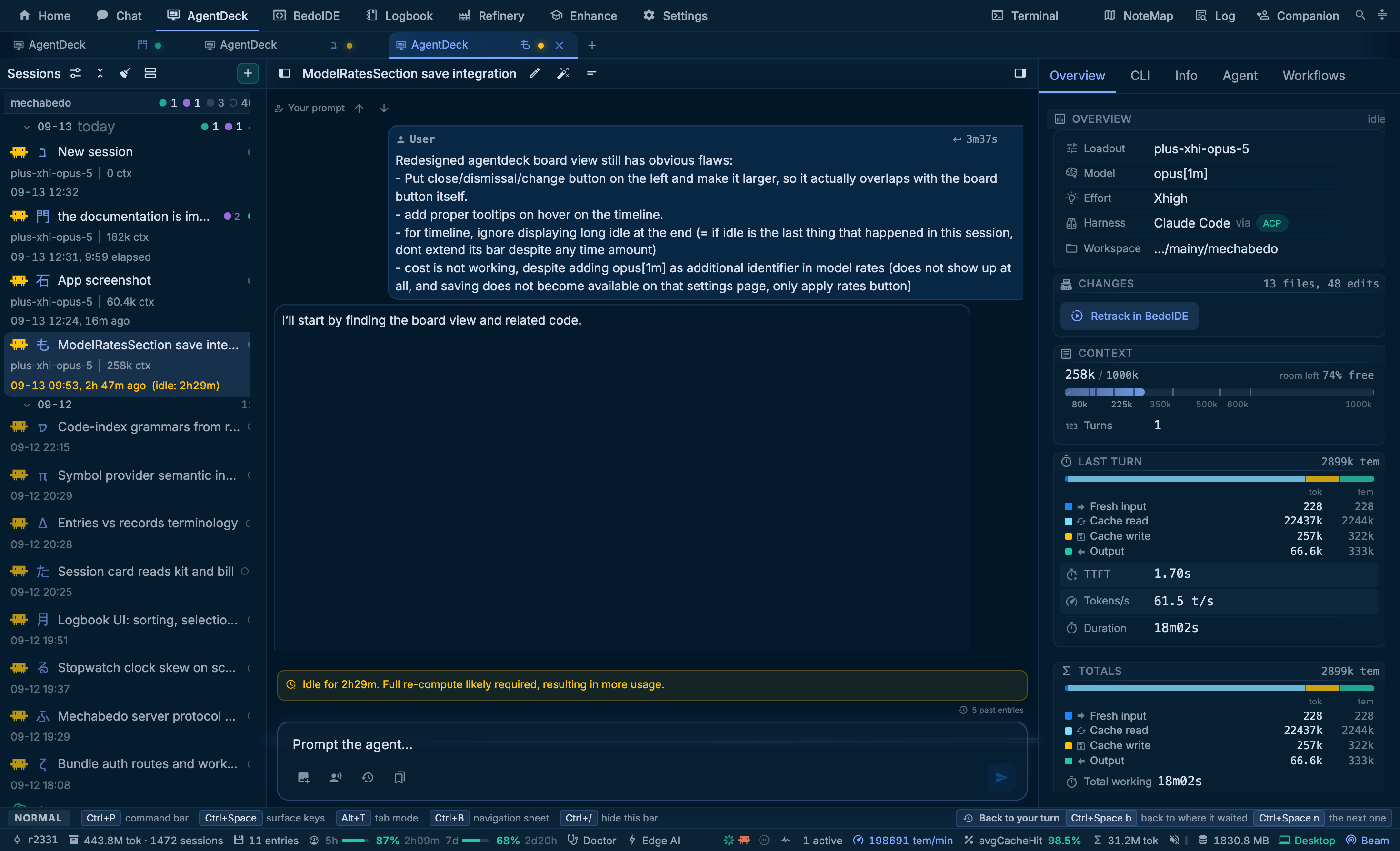
Three columns: the session rail on the left, the conversation in the middle, and a pane of tabs on the right.
The conversation
A turn is an ordered list of blocks rather than one string: text, reasoning folds, tool calls with their answers, plans, and the permission prompts the agent raised. Blocks are drawn where they happened and are kept with the session.
Two switches in the session's title bar change how the conversation reads. The first folds the thinking and tool calls between two turns into a short summary a small model writes. The second shows only your prompts and the replies, plus any question the agent asked you and any error, and hides everything else. Both are remembered for the window and leave the conversation itself untouched. The Logbook's reader carries the same title bar, so they are the same two switches there.
Two envelopes are drawn as provenance rather than as prompt text, because you did not type them: a relay hop from another session, and a workflow dispatch or conclusion.
An agent can flag something beside its reply: Claude Code falling back to another model, a hook blocking a turn, fast mode turning off. Each notice keeps a thin line where it happened. The ones since your last prompt also appear as cards under the session's title bar, tinted by how serious they are. Close one with its button; the line stays. Sending the next prompt clears them all. When the model that answered differs from the one the session is set to, the model row in the side pane shows it as a chip.
When a turn ends and the session is about to go idle, mechabedo can put turn actions under the reply. The first is Commit as "...", offered when files the session touched are still uncommitted, with a message the fast model drafted from the diff and the reply. The ↻ button lists rewordings from the fast model, and the pencil lets you write your own. Pressing an action does not commit anything itself: it sends the agent a turn asking it to stage its own files and commit with that message, so the agent checks what it stages. The tooltip shows the exact prompt. The cog leads to where the actions are configured, Enhance, Tools, vTools (Enhance).
A turn that stopped before the agent said it was done is marked on its turn line: out of steps, out of tokens or refused, with what it means on hover. Reply to let it carry on. mechabedo's own agent has a step budget per turn, Steps per turn under Settings, mechabedo coding agent, Resilience. When a turn uses it up, the last step answers with the tools off, so the turn ends with what it did, what it found and what is still open, and a notice card says the budget is spent.
A model can get stuck saying the same thing over and over. mechabedo's own agent listens to every reply as it streams, and when one starts repeating itself it cuts the reply there. The work before the loop is kept, and the agent is told to take its next step instead. A card in the conversation quotes what was being repeated. If the model loops again after two cuts in one turn, the turn ends and says why. Cut a reply that starts repeating itself under Settings, mechabedo coding agent, Resilience switches this off, and sets how many cuts a turn may take. It can also send a frequency penalty after a cut, which local model servers honour and some gateways refuse.
While mechabedo's own agent works, the busy toggle under the prompt says Steer where other harnesses say Interrupt. A message sent that way does not restart the turn: the agent reads it after the step it is on, keeps everything it already did, and carries on with your message in mind. Until then it sits above the prompt marked steered, read at the next step; it moves into the conversation where the agent read it. If the agent is waiting on a question it asked you, steering puts the question away and your message is the answer. If the turn ends before the agent gets to your message, it goes back to the front of the queue and is sent next.
Stop ends the turn and holds the queue. Nothing queued, and no steered message the agent had not read yet, goes out on its own: the list above the prompt says held after a stop, and your next prompt, or Send on the list, lets it go. mechabedo's own agent remembers where it was stopped, so it does not pick the interrupted work back up unless you ask it to.
Every queued message has a send button on its row, which sends that one now, ahead of the rest: steered into the running turn where the agent takes a steer, interrupting it otherwise, and straight out when the session is idle or held.
Claude Code sometimes starts a turn nobody sent, when a background task finishes or another Claude session messages it. That turn appears with no prompt above it, the session reads as working, and whatever you queue or send waits for it to end. A prompt the agent went idle without answering is closed after a short wait, and its turn is marked recovered from an unanswered prompt, so the queue behind it moves on.
A call that changed a file draws a diff per file: the changed lines with a few either side, both line numbers, and +n -m on the row above, which is there while the call is still folded. A call that touched one file opens it; a call that touched several leaves them folded until you pick one.
A command with several lines, or a deno eval or node -e one-liner, is drawn whole when you open its call, with each heredoc and inline script highlighted in its own language. The TypeScript and JavaScript inside it are laid out by dprint; the button on the block shows the command exactly as the agent sent it.
The prompt line
The line itself is the source of truth. Commands and mentions are read out of the text rather than held beside it, so a command still works on a line a workflow has armed.
| Token | Effect |
|---|---|
/new, /fork, /redo, /reset | Replace the session, on the loadout it launched on |
/fork <focus> <tier> | The same, with the whole record compressed into a handover first: a focus level for the depth, a mechabedo tier to write it, think by default |
/fork <loadout> | The fork opens on a saved loadout instead. A loadout names its own harness, so it decides which one the fork runs |
/model <name> [effort] | Move this conversation to another model, between turns, or give only an effort to change just that |
/rename <title> | Rename it |
/agents, /agents remove <n> | List the mechabedo agents aimed at this session, or take one off by its number |
/document | Stand a mechabedo agent on this session that updates the documentation when the work lands |
@path | A file mention, resolved against the session's directory and honouring .gitignore |
You do not have to remember the words. Type a command and a space, and the / menu offers what it takes next, each row saying what it does: /fork offers a focus, then a tier, then where the fork opens; /model the agent's models, then an effort; /agents remove the agents by name. The line under the menu reads the command back as typed, such as opens a session on Claude Code and puts this conversation in its prompt box, compressed at Compress. Tab or the arrows take a row, and Enter on a row you have not picked sends the line as it stands.
Once the line is complete and there is nothing left to pick, the line under the box stays and says what Enter will do. Escape hides it.
/new and /fork take any harness by its one word: opencode, claude, hermes, codex, qwen, maki or mechabedo, listed in the order of your Home launch row. One that is not installed here says so in the menu, and choosing it opens its install. /model offers the effort levels the running model actually takes, under the agent's own names, and none on maki and Hermes, which take no level mid-session. In a long model list, typing part of a name such as sonnet finds anthropic/claude-sonnet-4-5. After the switch the line above the box says which level the agent took.
While /fork <focus> reads the conversation, a card under the session title says which depth and tier are reading it, which model is behind that tier, how much record went in and how much handover has come back. Stopping it forks nothing.
A graph run the session started gets a card in the same place, below the fork's: the graph itself, which nodes are running and what they are doing, and a stop, a retry once it has failed, and a close once it has settled.
/model is refused mid-turn
A busy session answers SESSION_BUSY. A switch landing mid-turn would attribute a turn on screen to a model that did not write it.
The right pane
| Tab | Contents |
|---|---|
| Overview | The session at a glance: loadout, kit, model, effort, harness, directory; changes; context against the window, with where mechabedo's own agent compacts and what a compaction keeps, and the prompts you sent under it and, beside them, the tool calls and replies the agent answered with; the last turn's cost split; the totals |
| CLI | The real terminal the harness runs under |
| Info | Harness, model, loadout and directory, then what the harness can do, the tools and skills the session carries, its delegates and kit, and who supervises it |
| Agent | Orchestrator jobs scoped to this session |
| Workflows | Arm a workflow on the prompt line, and watch the run |
| Resources | The machine's CPU and mechabedo's memory, two minutes wide. Off until the tune menu switches it on |
The Overview's cost split is four numbers - fresh input, cache read, cache write, output - because the difference between a fresh read and a cached one is most of the bill.
The Info tab counts a tool or a skill as in context only where it rides every request. A skill's name and description do; its body is read when the skill is used. Claude Code and Hermes look mechabedo's tools up by name when they need one, so their Tools card says on demand instead of a token total. The field under the Tools heading filters them by tool name or by category.
Tabs or a pylon
The tune button at the end of the right pane's bar switches its layout. Tabs shows one pane at a time. Pylon stacks the panes on drums you turn sideways, so the Overview can sit above the CLI and either turns to another pane without moving the other.
- Turn one drum by dragging or scrolling its collar, with its arrows, or by scrolling sideways over it.
- Turn every drum at once with the double arrows in the bar, or by scrolling over the bar.
- Drag the gap between two drums to give one more height; double-click it to even them out.
The same menu picks an arrangement (Split, Trio or Monolith), which drum each pane rides, and how fast a drum turns. Each pane rides exactly one drum, so pressing t or a supervision mark turns whichever drum carries that pane.
The menu's Resources switches work under either layout. Resources pane adds Home's Resources graphs as a pane of their own: the machine's CPU and mechabedo's memory over the last two minutes, with the legend. It becomes a tab, or rides a drum you choose like any other pane. Slim strip on the Overview puts a small version of the same graphs on the Overview. Point at the strip to open the full pane or hide the strip.
The board
The rail says which sessions exist and which are working. The conversation says what was said. Neither answers "which of my agents is working, which is waiting on me, which failed, and what did it all cost" at a glance, which is the question somebody running a dozen sessions at once actually has.
The board answers it as a place: the agent royale, a small top-down world in which every session is an agent at a desk in an office of its own, and you walk between them. Open it with the first button of the Sessions title. It takes the whole workbench, and the conversation waits underneath exactly where it was. The close button at the board's top left sits where the board button was, so the press that opened it is the press that leaves.
It is an homage to suroi and surviv.io, drawn from shapes of its own: nothing is taken from either game. The controls panel credits both.
The world
An island of grass, with a beach and water around it. Each project is a lot of buildings facing each other across a street, in the rail's project order, with the project's name painted on the ground. You start on the street outside the first agent's door.
Each session is an agent sitting at its desk: the live ones and the most recent detached ones. Older detached sessions are counted on a sign at the end of the street, +N older sessions in the rail.
Each project is a district with a look of its own: timber, brick, cabin, concrete or glass walls, roofs, floors and streets. A project always gets the same one. Out on the grass between them stand shipping containers and sheds you can walk into, with a crate or two inside.
Teams work in shared offices. The sessions of a graph run sit in a studio, four desks divided by plants with a sofa and a whiteboard by the door, while the session that started them keeps its own office. A fleet gets a crew room, three roomier desks between bookshelves with a kitchenette and a round table. In a concrete or glass district every session works on a floor of six desks between low partitions, which stop you but not your rounds. The roof and the sign by the door name the team. A team that outgrows its desks opens another room.
Places stay put. A session keeps its office or its desk whether it is live or detached. When one leaves, its place stays empty and nothing else moves; a session that comes back within a minute gets its old place again. A new session takes the first free one.
Context piles up. A live session's office fills with documents as its context grows: paper on the desk first, then piles along the walls. Past 400k tokens the office is overfilled, and from 500k only a straight lane from the door to the agent is left clear. The piles stop you. Compacting clears them away, and so does detaching.
Tunnels connect the projects. Every lot starts with a small plaza and a stairway down. Walk into the stairs and you come out in the concourse under the island, which has a gate for every project with its name and who is working there painted in front of it. Walk up a gate's stairs to come out in that project. Holding the key you walked in with does not take you straight back: let go of it first.
A roof says what is inside. Painted on it are the title, the state with its clock (working 3m, waiting for you, idle 2h), the cost with the tokens in and out, and the model. The roof wears the harness's colour, muted once the session is detached, and a stripe along its door edge wears the state's colour. It lifts as you step through the door. The sign beside the door repeats the title and the state.
A bubble says what the agent needs. Bubbles draw over the roofs, so an agent waiting on you shows from the street. An idle agent has none.
| Bubble | Means |
|---|---|
| 🤔 | Working on a turn |
| ❓ | Waiting for you |
| 😱 | Failed |
| 💤 | Detached: drawn as a faded ghost that you and your rounds pass through |
| 👍 | Just finished a turn |
| 👋 | Just joined |
| 💀 | Just terminated |
The minimap at the bottom left draws every office and shared desk as a square in its state's colour and every stairway down as a yellow disc, with you as a dot, so who needs you shows from anywhere on the island. In the concourse it follows you and names the gates. M opens the big map of the whole island; click an office on it to stand outside its door at once, from anywhere, the concourse included.
The bar at the top left counts the sessions and the live ones and sums what they cost and how many tokens they used; the counter at the top right says how many agents are alive. Cost is recomputed from the rate table under Settings, Loadouts, like every other cost mechabedo draws, falling back to what the harness claimed where no rate matches.
Controls
| Key | Does |
|---|---|
W A S D, or the arrow keys | Walk |
Shift | Sprint, while walking and not firing |
| Pointer | Aim |
| Click | Punch or fire; hold it for the rifle |
E or F | Inspect the agent or sign in reach, or get into the car in reach |
1 2 3 | Fists, pistol, rifle |
R | Reload |
M | The big map |
| Wheel | Zoom |
Esc | Close the inspect card, then the big map |
The pistol fires once per click and the rifle for as long as the button is held. Each has a magazine: the count above the weapon slots says how many rounds are left, and says Reloading while one refills. R reloads, and so does firing an empty gun. Walls, trees and rocks stop a round; crates and barrels break.
Driving
Every project parks a car at the end of its street. Walk up to it until the prompt says Drive the <car> and press E; E again gets you out.
| Key, driving | Does |
|---|---|
W | Drive |
S | Brake, then reverse once stopped |
A D | Steer |
Space | Handbrake, for a slide round a corner |
The speed shows where the weapon slots were, and the view pulls back the faster you go. You cannot shoot while driving. A car bounces off agents and never hurts one, but it breaks a crate or a barrel it hits fast enough. The handling is after Pat Kerr's 1996 vehicle prototype, the one that became Grand Theft Auto's cars.
Ramps and roofs
The world has height, the way Grand Theft Auto 2's does. Take a ramp fast and the car leaves its lip flying, drawn larger the higher it is with its shadow on the ground below, and lands on whatever is under it when it comes down: the road, or a roof. Hit a wall on the way up and you bounce off it. A ramp as high as a roof, built against its wall, drives you straight up onto it. Up there you can get out and walk the roof; walk off its edge and you drop back down.
A parking deck and a fuel station's canopy stand on posts: drive under them, or up the deck's own ramp onto the top. Whatever you pass beneath fades so you can still see yourself.
The raceway
Beside the town lies a circuit, the Mechabedo Ring unless it has been changed: a figure of eight whose second pass climbs over the first on a bridge, with red and white kerbs on its corners, tyre walls outside the sharp ones, a pit garage with a ramp onto its roof, a grandstand, a parking deck, a warehouse with a roof ramp of its own and a fuel station. On the track lie a kicker, a boost pad, oil, cones and bales. Two cars wait on the grid behind the start line.
Drive over the start line to start a lap. The timing panel at the top shows the lap, its clock, your last lap and your best, and how many checkpoints you have passed. Every checkpoint counts in order; skip one and the lap starts over at the line. A race is three laps, and the feed tells each lap and the finish. Your best lap on a track is kept in this window, and getting out of the car stops the clock.
Roads join the town together: a ring road round the projects, avenues between them, and a road out to the raceway, lined with street lamps, hydrants and bins.
Changing the raceway
Everything about the raceway and the town that may change is one setting, which nothing in the window edits: ask an agent. mechabedo teaches every agent it starts how, in its mechabedo-royale skill, so "add a jump onto the warehouse roof", "make the track wider and five laps", "move the raceway below the town" or "put the shipped track back" is a request in any session. The board lays the world out again the moment it is written.
| You can change | For example |
|---|---|
| The loop | Its points, its width, how many laps make a race, its name, which side of the town it is on, or whether it is there at all |
| What lies on the track | Ramps, boost pads, oil, cones, tyre stacks, hay bales, barriers, at any point of the lap |
| What stands round it | Warehouses, pit garages, parking decks, grandstands, fuel stations, billboards, free ramps at any angle and height |
| The town | Its roads, and the lamps and hydrants along them |
A loop that crosses itself steeply gets a bridge of its own; a structure that would stand on the track is left out.
The keys belong to the board only while its tab shows, the keyboard is in normal mode and you are not typing in a field. A chord with Ctrl, Cmd or Alt always passes through, so the command bar and every other shortcut keep working. The controls panel at the bottom right lists the keys and folds away.
Inspecting an agent
Walk up to an agent, or to the sign beside its door, until the prompt at the bottom says Inspect <title>, and press E. The inspect card opens on the right; E again or Esc closes it.
The card says which harness, loadout and model the session runs on, its state with its clock and anything queued behind the turn, and five figures: turns, working time, tokens in, tokens out and cost. A live session adds how full its context is. Under them are the last prompt, the last result and the files it wrote; a file opens in BedoIDE.
The figures come from the archive, which imports a turn shortly after the harness settles, so a session that has only just started shows dashes for a moment.
| Button | Does |
|---|---|
| Plan, Fork, Changes, Logbook, Refinery, Terminal, Handover | Start the next piece of work from this session's record, or open the surface that answers a question about it. Offered where they apply, and none of them puts the session back |
| Open session | A live session's conversation, in this tab or in the tab that already holds it |
| Open project in your editor | The session's directory in your external editor |
| Terminate | A live session only: the same question a shot asks, without the shooting |
Terminating an agent
An agent has health. Shoot or punch a live one down to nothing and it is downed: it slumps, takes no more damage, and a dialog asks Terminate <title>? before anything happens.
Drawing the diagram…
Terminate ends the session's process, and cuts its turn off if it was working. The conversation stays in the rail as a detached session you can resume: the agent falls, a marker stays where it fell, and a moment later its ghost sits back down. A session with nothing to resume from is removed instead and leaves the rail for good. The dialog says which of the two it will be before you answer.
Cancel gets a downed agent back up at full health. So does a terminate that fails, and the feed says why.
Only a live agent can be terminated. Rounds pass through a detached one, and the feed says it is already stopped. Nothing else on the board ends a session.
The kill feed
Under the alive counter, the feed tells what the sessions do the way a kill feed tells kills, newest first, each line fading after a few seconds. Opening the board is not news: it tells only what changes while you watch.
| Line | When |
|---|---|
<title> finished a turn · <cost> | A turn ended; the cost is the session's so far |
<title> is waiting for you | It needs your answer |
<title> errored | It failed |
<title> joined, left or is back | A session started, ended or came back |
You <weapon> <title> | You terminated it |
<title> could not be terminated: <reason> | Ending it failed |
<title> is already stopped | You shot a detached one |
You <weapon> a crate | You broke a crate or a barrel |
You <project> by tunnel | You came up the stairs in that project |
A follow-up started from the inspect card answers in the feed too.
When it moves
With nobody walking and nothing working in view, the board draws nothing. An agent at work in view moves at the page's calm ambient pace, and walking, shooting and zooming run at the display's full rate.
It stops altogether while its tab or the window is hidden, and while the terminate question is open, so nothing moves under the dialog. Whatever changed meanwhile appears when it starts again. With the system's reduced motion setting or Low power mode under Settings, Appearance, the agents hold still: no idle motion, particles or shake, and a sprint neither kicks up dust nor widens the view. Walking and shooting still move, because they answer you.
The rail is the list
The world is a picture: it cannot be scrolled, searched or read by a screen reader. The rail lists the same sessions, and the prompt and the inspect card are ordinary page text.
The board is a tab's own location, ?board=1, so one tab can be on it while its neighbours are on their conversations - and a tab left on the board reopens on it.
Next
- Workspaces and sessions - what the rail is listing
- Workflows - arming the prompt line
- Orchestrator - the Agent tab