
Workspaces and sessions
A workspace is a directory plus the harness chosen for it. A session is one conversation running inside a workspace. A workspace can hold several sessions; a session belongs to exactly one.
Drawing the diagram…
Picking a harness
The harness is chosen when the workspace is created and does not change afterwards. To run the same directory on a second agent, make a second workspace on the same path - workflows do this on your behalf when a fleet member's loadout names a different harness.
Surfaces that offer a harness check whether its route is ready before the workspace is created, and send you to the install rather than failing at spawn time. See Harnesses.
What a session is
Behind every session is a real agent process speaking the Agent Client Protocol. The workbench renders what that process sends - text, reasoning, tool calls, plans, permission requests - and nothing is reconstructed.
The life of one
Drawing the diagram…
Two things follow from the agent being a real process:
- A restart ends every live session. What survives is the harness's own conversation on disk, and the registry row naming it.
- Nothing is lost by that. A detached row appears in the rail under its own project rather than in a list of its own, so a directory shows what is running in it and what can be brought back, in one place.
Resuming
A resume is session/load by the id the harness kept, so the conversation continues as the harness stored it. It is idempotent: asking for a conversation that is already live gives you that session back rather than a second agent process loading the same file.
The name comes back with it. So does the loadout it was launched on - stamped as what the conversation ran on, not re-applied, since a resume runs on whatever the harness stored.
What a reopened conversation is missing, and what it is not
A loaded session replays as bare updates with no turn boundaries anywhere in it, so mechabedo draws them as it replays. The Overview counts those turns but leaves them out of Last turn, Totals, working time and cost, which are what this process watched happen - the card says since reopening when the two differ. Context comes from the archive's own reading until the first real turn replaces it.
The rail
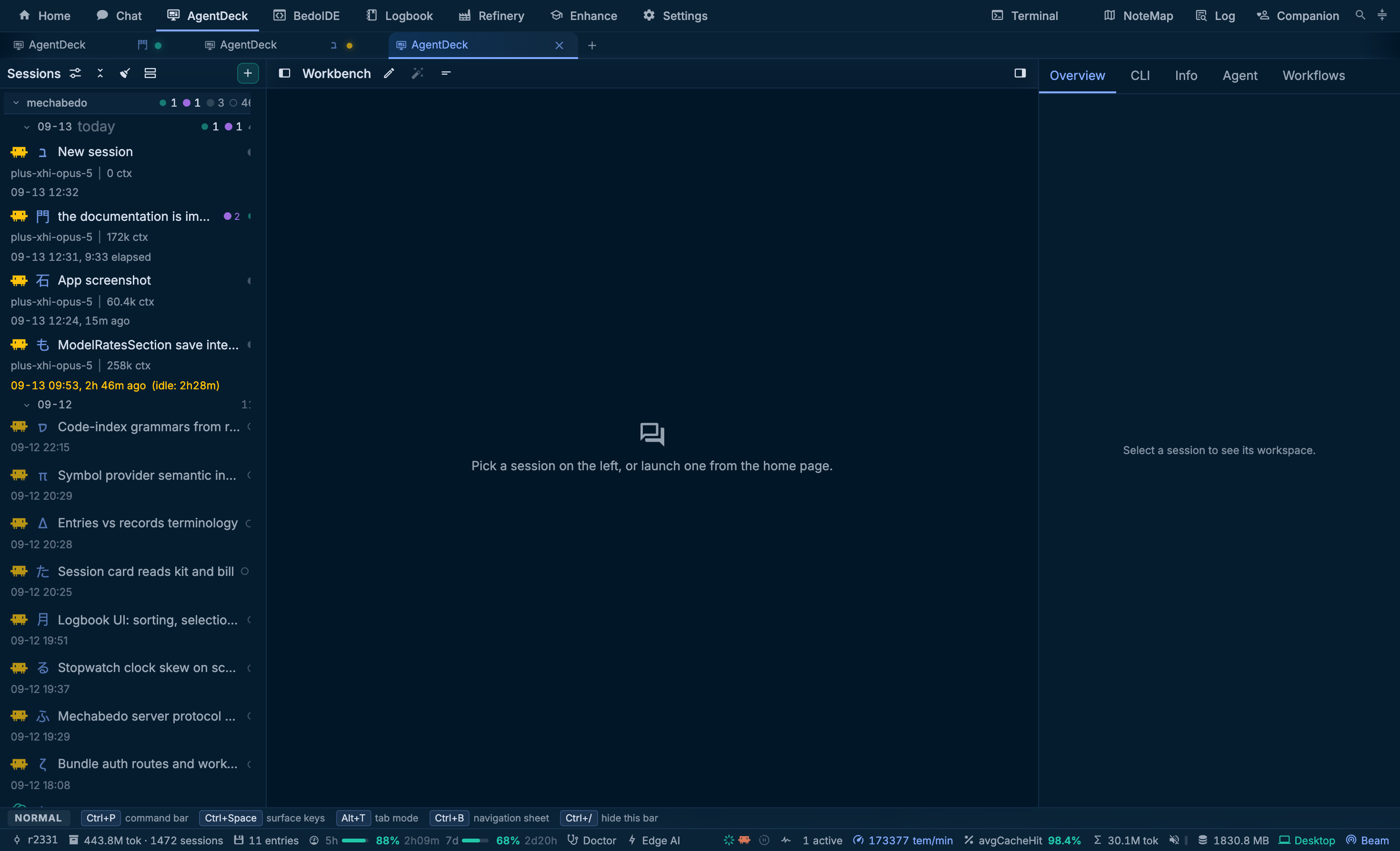
Sessions are grouped by project, then by day, newest activity first. Pin a project with the button on its header and it stays on top, in the order you pinned it, however recently its sessions ran.
| Part | What it is |
|---|---|
| The harness mark | Which agent runs it |
| The symbol beside it | A stable per-session glyph, so two Claude Code sessions read apart at a glance. The tab showing that session carries the same one |
| The loadout and the context | What it is running on, and how full it is |
| The draft chip | draft, while a prompt has been typed for that session and not sent. Each session keeps its own draft, so switching away and back finds it where you left it |
| The tree pill | A tree icon and a count, on a session with agents, workflow runs or other sessions below it. Green while any of them runs. Pressing it opens the tree |
| The clock | Since the last turn, and how long it has been idle |
What runs below a session
Pressing a row's tree pill opens what runs below that session, in place under the row:
| Part | What it is |
|---|---|
| Supervisors | The orchestrator agents on this session, such as /forever or /nohalt. Pressing one opens the Agent tab |
| Agents | The harness's own subagents, workflow runs with their agents and phase, and background tasks, each with its tokens and how long it has run |
| Sessions | The sessions opened for this one: subagents that stream as sessions of their own, delegates, spawns and fleet members. One working in another project shows that project's name, and has its own row in that project's group too |
Pressing an agent opens its conversation: live, where it streams as a session, or read-only from what the harness wrote. Pressing a background shell opens the end of its output, which keeps updating while it is open. A tool call in the conversation that started agents lists them the same way.
The tree opens only when you press the pill. Rows that finish while it is open stay in place; ones that had already finished when it opened fold behind one line.
A session whose agents are still working after its turn has not halted, so a /forever or /nohalt agent waits for them to report back. A running background shell also marks the row as working below it, but nothing waits for one, since a dev server may never end.
Two folds sit under a group:
Archived is how a row leaves the working list without leaving the rail. Archiving ends the process first, so it always implies detaching. The fold is closed by default and stays closed when a row lands in it - that is the point of it. It reaches back a number of days you set; anything older is in the Logbook, which keeps every session whatever the rail shows.
Self-learning is what the kits that ran here have learned from the work done in this directory. It is drawn only where a pass has already run or where some kit has self-learning switched on, and its header holds the run-now action. A row is one pass, with what it changed on its second line, its diffs, and a revert.
Naming
A session's title starts as the harness's own, or as the first prompt. You can take it over three ways: from the pane bar, with /rename, or with the wand beside the title, which asks the cheap tier for a six-word name.
Next
- The workbench - the three columns and the prompt line
- Loadouts and kits - what Launch decided
- Transcripts - where a finished session goes